

Market research is evolving rapidly with AI, and Anthropic’s Claude is emerging as a powerful assistant for competitor analysis and trend discovery. For technical and analytical professionals – marketers, product managers, startup founders, and business analysts – Claude offers a way to conduct fast, structured, and repeatable workflows for market intelligence.
Instead of spending weeks compiling reports and spreadsheets, teams can leverage Claude’s large context window and natural language prowess to benchmark competitors, extract insights, and spot emerging trends in a fraction of the time.
This comprehensive guide will show how to use Claude’s various interfaces (web, API, and CLI) for competitor analysis and trend research, with real-world examples and integration ideas that turn raw data into actionable business decisions.
Why Use Claude for Competitor Analysis & Trend Detection
Claude AI is not just a chatbot – it’s an AI research assistant capable of digesting huge volumes of text and outputting structured insights. Three key strengths make Claude ideal for competitor analysis and trend spotting:
High Context Capacity: Claude 4 models can handle extremely long inputs (hundreds of pages or more). This means you can feed Claude entire industry reports, survey results, or multiple competitor web pages in one go. It excels at summarizing complex information and spotting key trends in large datasets. For example, Claude can read through a 50-page market research PDF or a year’s worth of social media reviews and instantly highlight recurring themes or shifts in consumer sentiment.
Analytical Depth and Structure: Claude can generate detailed, structured analyses of competitors’ strategies. Given the right prompts or data, it will produce head-to-head comparisons of product features, pricing models, marketing tactics, and more. It follows competitor analysis frameworks and can even suggest new angles to explore. Importantly, it does so in a conversational manner, explaining the why behind the data – akin to having a diligent analyst on your team.
Automation and Repeatability: With Claude’s API and Claude Code (CLI) interfaces, you can automate multi-step research workflows. This moves competitor analysis from a one-off manual effort to a repeatable process. Claude’s outputs can be constrained to structured formats like JSON for easy downstream processing, enabling seamless integration with your spreadsheets, databases, or dashboards. By scripting your workflow once, you can rerun analyses whenever there’s new data or a new competitor, ensuring your intelligence stays up-to-date without reinventing the wheel each time.
In short, Claude brings speed, scale, and consistency to market research. It augments your expertise by handling the heavy lifting of data collection and analysis, so you can focus on interpretation and strategy. The next sections break down how to leverage Claude in practice – from quick explorations in the web UI to full-fledged automated pipelines via the API and CLI.
Key Use Cases and Examples for Claude in Competitor Analysis
Claude’s capabilities shine across a spectrum of competitor analysis scenarios. Below are real-world example applications illustrating how Claude can tackle various tasks in competitive research and trend analysis:
Head-to-Head Competitor Comparison: Claude can directly compare two companies (e.g. Company A vs Competitor B) across key dimensions. For instance, in the mattress industry Claude was used to produce a head-to-head comparison of Casper vs. Purple, covering their content strategy, influencer approach, brand positioning, advertising focus, and more. The output was a structured breakdown highlighting each brand’s tactics side by side, which is invaluable for spotting differences and opportunities.
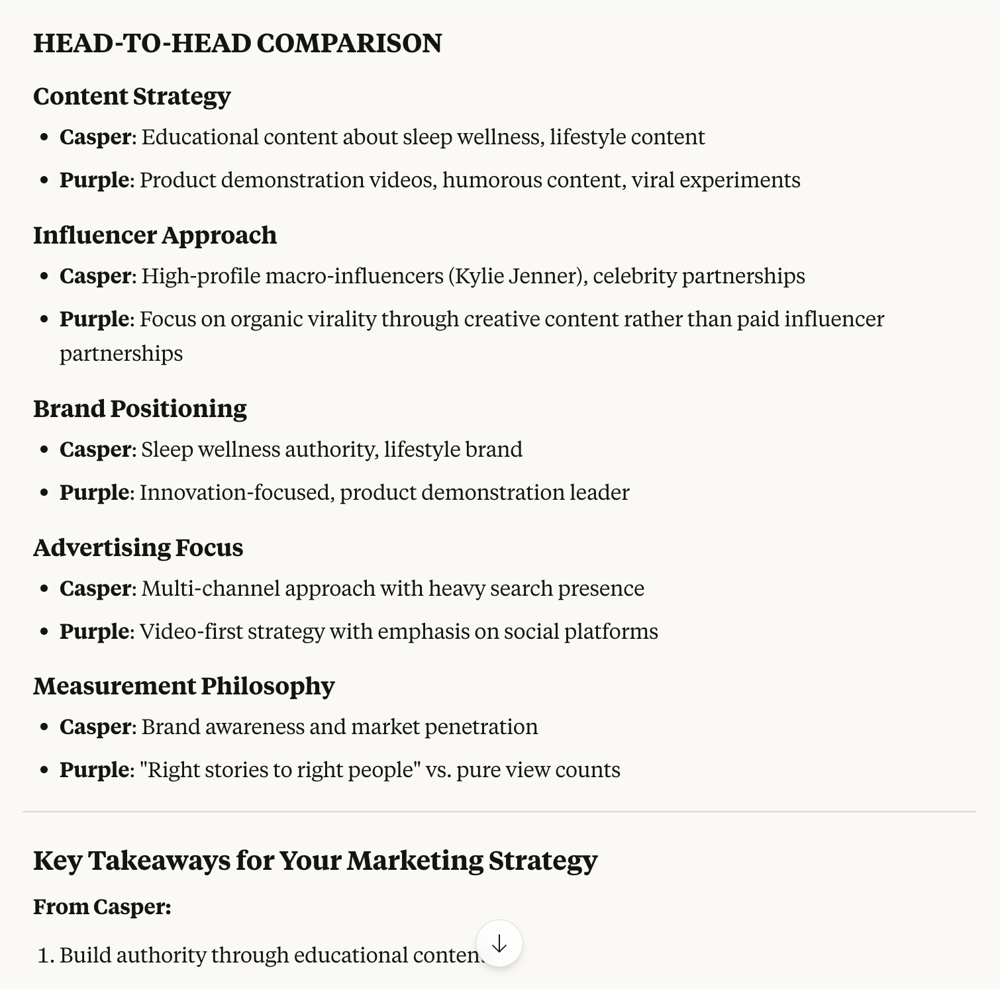
Claude can generate detailed head-to-head comparisons of competitors. For example, the analysis above contrasts Casper and Purple on content strategy, influencer marketing, brand positioning, advertising focus, and metrics philosophy. Such structured comparisons help identify each competitor’s strengths and strategic focus areas.
Feature-by-Feature Product Comparison: For product managers, Claude can compare feature sets in detail. By supplying product specs or website content for each competitor, you can prompt Claude to create a feature comparison matrix. It will list features that each product offers (or lacks), and even note unique selling points. This helps identify where your product is ahead or behind. For example, a software startup could have Claude compare Project Management Tool X vs. Tool Y, generating a bullet list of features (e.g. integrations, AI capabilities, pricing tiers) and noting which tool leads in each category.
Pricing Structure Extraction: Claude is adept at extracting and normalizing pricing information from websites or documents. You can ask it to read competitors’ pricing pages and output a structured summary of pricing models (tiers, costs, free vs paid features, etc.). In one use case, users had Claude browse a competitor’s site (e.g. ElevenLabs) to summarize its pricing and feature list. The result was a clear breakdown of each plan and its offerings – a task that would be tedious manually. Having a concise pricing comparison across competitors enables quick benchmarking and identifying opportunities for pricing strategy adjustments.
Product Positioning & Messaging Analysis: By feeding Claude marketing copy (homepage text, taglines, about pages) of different brands, you can have it analyze positioning and messaging. Claude will highlight how each competitor positions itself (e.g. “innovative disruptor vs. trusted incumbent”) and the key themes in their messaging. It can also point out differences in tone or unique value propositions. This helps marketing teams understand how competitors are communicating with the market and where there might be a positioning gap for your brand. Claude’s analysis of Casper’s vs Purple’s branding, for example, noted Casper’s focus on sleep wellness lifestyle versus Purple’s emphasis on innovation and product demos, which could inform how a new entrant differentiates itself.
Market Gap Identification: Combining the insights above, Claude can assist in finding unmet needs or gaps in the market. By comparing features, pricing, and positioning across several competitors, it might identify a feature none of them offer or a customer segment they overlook. For instance, if Claude analyzes five competing apps and notes that none serve a certain user persona or lack a particular integration, that gap could be your opportunity. You can explicitly prompt Claude with something like: “Based on the competitor data provided, what customer needs are not fully addressed by any competitor?” Its natural language reasoning will enumerate potential gaps or niches, supported by the data it reviewed.
Trend Summaries from Multiple Documents: Claude’s large context window means you can provide it with a collection of industry reports, news articles, or survey results and ask for the overarching trends. It will sift through the documents and pull out recurring patterns or statistics, effectively doing in minutes what an analyst might do in days. For example, imagine feeding Claude several quarterly reports from players in your industry; it can output a summary like “Key Trend: Growing demand for eco-friendly products – mentioned by 3 out of 5 competitors. Another Trend: Shift towards subscription pricing models.” According to industry experts, AI tools like Claude can spot patterns across disparate data sources that humans might miss. Claude is especially strong at this because it can handle long reports and surveys, distilling them into clear insights about consumer behavior or market shifts.
Multi-Document Sentiment & Voice-of-Customer Analysis: A specialized trend analysis use-case is social listening and sentiment analysis. Claude can review thousands of customer reviews, social media comments, or survey responses (either via direct input files or through integrated tools) and summarize the sentiment and common pain points. Instead of manually coding responses, you can ask Claude “What are the top complaints customers have about Competitor X across these reviews?” or “Summarize the general sentiment about Feature Y in this dataset.” AI can determine if perceptions are positive, negative, or mixed and why. This real-time pulse on the customer mood helps you react faster and tailor your strategy accordingly.
Each of these scenarios can be executed with Claude guiding you interactively or working behind the scenes via automation. Next, we’ll explore how to use Claude’s interfaces – Web, API, and CLI – to implement these use cases effectively, and how to integrate Claude’s outputs into your existing tools.
Claude Interfaces for Market Research Workflows
Claude provides multiple interfaces to accommodate different workflow needs. Whether you want a quick interactive analysis or a fully automated research pipeline, Claude has an option:
1. Claude’s Web Interface – Quick Exploratory Analysis
The Claude web interface (accessible via the Claude.ai chat or related apps) is great for initial exploration and interactive queries. It’s as simple as chatting with Claude: you can paste in some context (like a competitor’s about page or a news excerpt) and ask questions or for summaries. This interface shines for ad-hoc analyses such as brainstorming competitor lists, doing a first-pass SWOT analysis, or asking Claude to outline a market research plan.
For example, you might start a chat by asking: “Claude, can you help me do competitor research?” Claude will typically respond by requesting more details (industry, specific competitors, goals like pricing vs features, etc.). With a back-and-forth, you can identify key competitors and then ask Claude to deep-dive into each one. Claude’s conversational guidance can surface insights on marketing strategies, content approaches, and even suggest frameworks for analysis. Users have reported Claude can enumerate competitors and outline their strategy highlights in one go.
However, using the web interface for large-scale competitor analysis has some practical limitations. The context window, while large, can still get filled if you sequentially analyze many competitors in one chat. In practice, you might find Claude’s responses becoming less detailed by the time you ask about the 3rd or 4th competitor in a single thread. The workaround is often to start a fresh chat and copy in the relevant context again, which is doable but a bit manual.
As an example, one product manager described analyzing five competitor websites via Claude’s browser chat – by the third, responses got superficial, forcing them to restart in a new chat and paste the earlier info again. This copy-paste dance can be time-consuming if you have many inputs. Additionally, any outputs you want to keep (like each competitor’s analysis) you’ll need to manually save – often by copying results into a document or spreadsheet.
When to use the Web UI: Use Claude’s web interface for quick questions and one-off analysis. It’s ideal at the start of research – exploring who your competitors might be, getting Claude’s take on industry trends, or generating outlines (e.g. “Give me a competitor analysis template”). It’s also useful for brainstorming strategic ideas once analysis is done (Claude can help you think of marketing strategies based on the findings). For handling a couple of competitors or a moderate amount of text, the web UI is fast and convenient. But if you need to process dozens of files or regularly update analyses, consider the API or CLI for efficiency.
2. Automating Analysis with Claude’s API
For structured, repeatable research workflows, the Claude API is the go-to interface. The API allows you to programmatically send data to Claude and receive outputs, enabling integration into your own apps, scripts, or data pipeline. Here’s how the API empowers competitor analysis and trend tracking:
Bulk Data Processing: Through the API, Claude can handle bulk analysis tasks that would overwhelm a chat session. You can loop through multiple competitors or thousands of data points. For example, OpenMoves (a marketing firm) used Claude’s API to analyze thousands of Google search queries in bulk, something impossible to do through the ChatGPT or Claude web UI without hitting limits. By writing a Google Apps Script that calls Claude’s API for each query, they built a tool to classify queries and provide reasoning at scale. This demonstrates that Claude’s API can reliably process large volumes of data in an automated fashion, whether it’s hundreds of competitor product descriptions or a massive survey dataset.
Structured Outputs (JSON/XML): When automating, it’s often critical to get the output in a machine-readable format for further analysis. Claude’s API supports structured output formatting, including a JSON mode that guarantees valid JSON responses following a schema you define. This is extremely useful for competitor data extraction. For instance, you can prompt Claude via the API: “Extract the following info about Competitor X’s product: {Name, Key Features, Pricing, Target Customer} and output as JSON.” With structured output mode, Claude will return a clean JSON object with those fields filled, avoiding the common issue of malformed JSON. Such structured data can be ingested directly into your databases, or parsed to populate a comparison table in Excel/Sheets.
Batch Processing & Parallelism: The API allows for asynchronous or parallel requests, meaning you could analyze multiple items in parallel if your infrastructure supports it. While not as straightforward as Claude Code’s built-in parallel agents (discussed below), you can still script concurrent calls. This is helpful for speeding up large jobs – for example, fetching summaries for 10 competitor websites at once, or running 12 months of trend analysis prompts in parallel. Anthropic’s documentation even highlights a batch processing capability and high token limits for enterprise tiers to handle large analyses at scale.
Multi-File Ingestion: The Claude API includes a Files API endpoint that lets you upload documents (CSVs, PDFs, etc.) to Claude’s server and reference them in your prompts. This means you can programmatically provide Claude with a whole library of competitor materials – PDFs of whitepapers, CSVs of product specs, or text dumps of websites – and then query them. For example, you could upload 5 competitors’ annual reports and then ask Claude (via the messages API) questions like “Compare the growth strategies mentioned in each report”. This approach is powerful for trend analysis across documents, since Claude can effectively read each file and combine insights. The file upload limits are generous (up to 100 MB per file on higher tiers, and multiple files per query), so even very large documents are fair game.
Integration with External Data Sources: Using the API, Claude can be part of a larger automated pipeline. For instance, you might connect Claude with data from Crunchbase or Similarweb: a script could pull the latest data via those platforms’ APIs (e.g. funding rounds, web traffic stats) and then feed it to Claude to interpret. Conceptually, you can have Claude answer questions like “Based on Crunchbase data, which competitor has the highest growth rate in the past year and what might be driving it?” after you provide the data. Similarly, Claude can ingest SEO or traffic metrics from Similarweb and give you a plain-English summary of how each competitor’s online presence is trending. These kinds of integrations require some coding, but they unlock AI-driven analysis on top of real-time data streams.
Connecting to Business Tools: The API also enables direct integration into tools like Google Sheets, Notion, or BI dashboards:
Google Sheets: There is an official Claude for Sheets add-on that lets you call the Claude API from spreadsheet formulas (e.g. =CLAUDE("Summarize X")). This is fantastic for applying Claude’s analysis across many rows of data. For example, you could have a sheet of 20 competitors and use a Claude formula to generate a one-sentence positioning statement for each, or to score each competitor on certain criteria based on descriptions. The Sheets integration excels at prompt testing at scale and survey analysis in parallel. It essentially brings Claude’s brain into your spreadsheet cells. Teams can set up evaluation suites or models where Claude’s outputs populate a competitive scoring model in Sheets.
Notion or Document Repositories: While no native Claude add-on exists for Notion at this time, you can use the API to funnel Claude’s outputs into your knowledge bases. For instance, you might use a script to automatically create a Notion page with Claude’s competitor analysis summary each quarter. Using Notion’s API, the Claude-generated text (or tables) can be inserted, giving your team a living competitor intelligence wiki. This ensures market intelligence is organized and easily accessible – Claude does the analysis, and Notion stores the polished report with collaboration features for your team to comment or add notes.
Business Intelligence (BI) Tools: Claude’s JSON outputs can be fed into BI dashboards (like Tableau, PowerBI) after some slight transformation. Imagine having a dashboard that visualizes competitor feature gaps or trend frequencies, powered by Claude’s analysis on the backend. While Claude might not connect directly to the BI tool, an intermediate layer (a small script or ETL process) could convert Claude’s outputs into rows for your data visualization. This way, non-technical stakeholders can see charts of “common marketing themes in our industry” or “feature comparison matrix” that were originally derived from Claude’s language understanding.
Example – Claude API in Action: To illustrate, consider automating a competitor feature extraction. You have a list of competitor websites. Using the API, you write a script that for each URL:Fetches the HTML content (using a web scraping tool). Sends a prompt to Claude like: “Here is the homepage/about page of [Competitor Name]: [text]. Extract a JSON object with keys: {ProductName, TargetAudience, KeyFeatures, PricingModel, UniqueValueProp}.”Receives Claude’s structured JSON output and inserts it into a database or Google Sheet.After running this for, say, 10 competitors, you’ll have a structured dataset of all their key attributes gleaned from their own websites – all done automatically. Now you can query this data or ask Claude follow-up questions about it (or even have Claude itself compare the JSON objects!). This kind of automated competitor data extraction is highly efficient and ensures consistency in how information is gathered and formatted, reducing human error in manual copying.
In summary, the Claude API turns one-off AI analyses into scalable, repeatable workflows. It’s the bridge between Claude’s intelligence and your existing data ecosystem. When you need to regularly monitor competitors or continuously analyze trends (e.g. a weekly update of “what’s new with our competitors?”), investing in an API-based solution pays off. With structured outputs and integrations, Claude becomes a silent engine feeding your market intelligence systems with analysis, 24/7.
3. Claude CLI (Claude Code) – Advanced Local Analysis & Automation
For power users and developers, Claude Code (Claude’s CLI tool) offers the most advanced way to orchestrate market research workflows. Claude Code is a command-line interface that runs on your local machine or server, giving Claude access to your file system and enabling complex, multi-step operations via natural language commands. While originally built for coding tasks, users have discovered it’s extremely capable for non-coding tasks like competitive analysis, because it can manage and manipulate files automatically.
Key advantages of Claude Code/CLI for market research:
- Local File Access and Persistent Context: In Claude Code, your files are the context. You can have a folder (say,
Competitive Analysis) with files likecompetitors.md,product-info.md(your product details), and Claude will automatically read those as context in the conversation. This is a game-changer for avoiding repetition. For example, ifcompetitors.mdlists all your competitor names, Claude can loop through them without you copying that list each time. Ifproduct-info.mdhas your latest features and pricing, Claude always references the current version – no need to re-upload data when it changes. In contrast to the web UI where each chat starts fresh, the CLI environment treats the folder’s files as an always-on knowledge base. - Multi-Step Agents and Automation: Claude Code allows the creation of custom agents, slash commands, and hooks that automate multi-step workflows. In the context of competitor analysis, you can script a pipeline and run it with a single command. For example, you could define a slash command
/update-competitorsthat tells Claude:For each name incompetitors.md, use a “competitor-research” agent to visit that competitor’s website (Claude Code can utilize a browser tool via MCP) and generate a markdown fileCompetitorName.mdwith the analysis.After processing all competitors, aggregate the results – e.g. generateprice-comparison.mdandfeature-comparison.mdfiles comparing all competitors.You run/update-competitorstoday and in a few minutes have updated analyses. Next month, you just add a new competitor to the list and run the command again – Claude Code takes care of the rest, agents and all, with no further prompt engineering needed. This “define once, run anytime” approach makes market research repeatable on demand. You don’t even have to remember the sequence; the saved command encapsulates it. - Parallel Execution: One standout feature – Claude Code can spawn multiple agents in parallel for faster analysis. As noted in an example from ProductTalk, a user ran a
/competitive-researchcommand which launched 15 Claude agents, each researching one competitor simultaneously. In a minute or two, all 15 competitor profiles were done, saved into separate files. This massively accelerates analysis when you have many entities (competitors, products, or data segments) to analyze. Instead of doing them one-by-one or hitting API rate limits, Claude Code orchestrates parallel threads of work. The result: comprehensive competitive landscapes generated in minutes rather than hours.
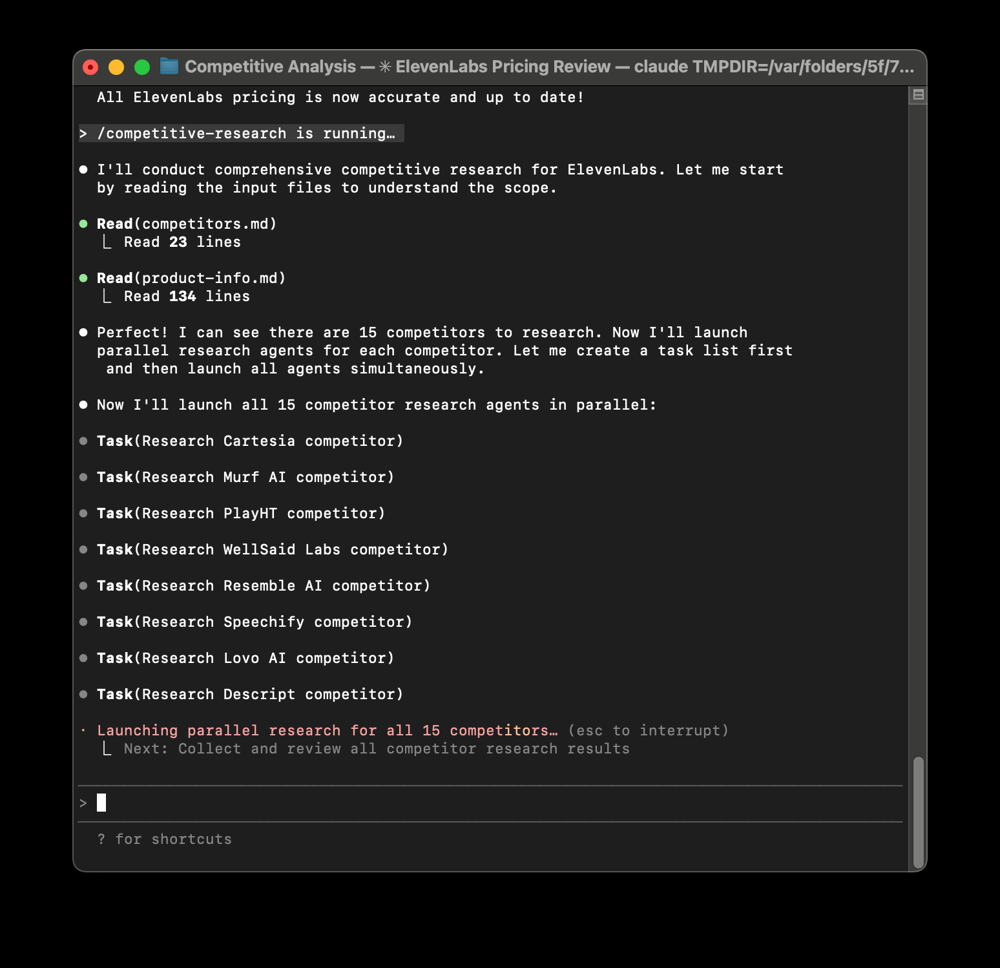
Claude Code can parallelize complex tasks. In the example above, a CLI session runs a /competitive-research command which spins up 15 agent tasks in parallel – each tasked with researching a different competitor (e.g. Cartesia, Murf AI, PlayHT, etc. in the screenshot). Within moments, Claude Code had all competitor analyses completed and saved to files, dramatically speeding up the competitive landscape analysis. Such parallel agent execution is unique to Claude’s CLI, enabling rapid scaling of research tasks.
- Local Data Processing and Analysis Tools: Claude Code isn’t limited to text generation. It actually supports running code and data analysis locally (with your permission). It has a built-in Python environment with libraries like pandas, allowing for data crunching and visualization in the workflow. For market research, this means you could, for example, load a CSV of sales data or a spreadsheet of survey results in the CLI, have Claude Code perform statistical analysis or generate charts, and incorporate those findings into the written analysis. It blurs the line between data scientist and analyst – Claude Code can clean data, generate charts (as SVGs or image files), and include them in reports. If you have local datasets (like downloads from Similarweb, or CRM export data), Claude Code can be directed to process those files and give you human-readable insights plus charts. All this happens in a reproducible way: the code used and the outputs can be saved for audit or tweaking.
- Example – End-to-End Competitor Intelligence Workflow: Imagine you maintain a folder with:
competitors.md– list of competitor names and homepage URLs.product-info.md– your latest product features and pricing.A directorycompetitor_profiles/where individual files for each competitor will be stored.Using Claude Code, you create an agent or command to:Readcompetitors.md, and for each competitor:Fetch their homepage (Claude Code can use a web-fetch tool if configured).Summarize key messaging, features, and any pricing info found.Save that summary tocompetitor_profiles/Name.md.After looping through all, combine the info to producecomparison_feature_matrix.mdandcomparison_pricing.md.Maybe run a small Python snippet to aggregate any numeric metrics (if you have them) for a chart.Once set up, this workflow runs on command. The first setup might take some time (writing instructions, configuring any web access), but subsequently, updating your competitive intelligence is one command away. The outputs are local markdown and image files that you fully control. You can version them with Git, share them internally, or even have another AI (like OpenAI Codex CLI) read them – there’s no lock-in. This level of automation and data ownership is a strong advantage for enterprises concerned with data privacy and long-term access. - No-Code/Low-Code Usability: While CLI sounds technical, even non-developers are starting to adopt Claude Code by following guides and templates. The interface does require comfort with terminal commands, but once your environment is configured, using a custom slash command or agent can feel like using a specialized chat. Some product managers and researchers have been surprised how Claude Code “crept into everything” they do beyond coding, from managing tasks to conducting research and writing reports. If you aren’t a programmer, you may need initial help setting up, but after that the natural language interface means you’re instructing Claude in plain English. The payoff is huge if competitor analysis is a regular need – you effectively get an AI-powered research assistant living on your computer, ready to execute complex workflows without forgetting steps.
When to use Claude CLI: If you have a large, ongoing research workload, multiple data sources, or strict data privacy needs, the CLI route is ideal. It’s particularly suited for analysts who want repeatability and speed – e.g., in an agency setting tracking many competitors for many clients, or a product team doing monthly market reports. It does require more setup than clicking around a web UI, but it pays off by eliminating repetitive manual tasks (no more copying text between chats or updating countless spreadsheets by hand).
As one expert noted, once you experience what’s possible with Claude Code, doing research “manually” via chat feels like moving files one by one when you could zip them. Claude Code is how you unlock the full potential of Claude as an autonomous research agent.
Integrations and Workflow Ideas with Claude
Claude’s value multiplies when you integrate it into your broader market research toolkit. Here are some integration ideas and workflows that combine Claude’s AI capabilities with popular tools to supercharge competitor analysis and trend research:
- Claude + Google Sheets for Scoring Models: Use Claude’s API (or the Claude for Sheets add-on) to populate a competitor scoring spreadsheet. For example, create columns for various criteria (Product Quality, Pricing Competitiveness, Brand Visibility, etc.). For each competitor (each row), have Claude generate a score or descriptive evaluation based on data. This could be done by a formula calling Claude with a prompt like “Rate [Competitor] on product quality vs the market on a scale of 1-10 and explain briefly.” The result could fill two cells: a numeric score and a one-liner explanation. By doing this in Sheets, you can easily adjust criteria, add weighting, and create a dashboard (with charts) of how competitors stack up. The Claude integration for Sheets makes this seamless, enabling prompt execution in cell formulas. Marketing teams can then tweak prompts or refresh data on the fly, and have an always-updated competitive scorecard.
- Claude + Excel for Advanced Analysis: If you prefer Excel or need more advanced analytics, Claude can still play a role. You might use the API to generate a CSV of analysis results (for example, a breakdown of each competitor’s features) and then open that in Excel for further analysis, pivot tables, or combining with other data (like sales figures). Additionally, with Claude Code’s ability to run Python and output to files, you could have it directly produce Excel-readable outputs. Another angle is using Excel’s scripting (VBA or Office Scripts) to call the Claude API, similar to the Google Apps Script example. The idea is to let Excel handle the numeric analysis while Claude provides contextual interpretation. For instance, you could calculate growth rates in Excel but ask Claude to write a summary of “Key growth trends and anomalies among competitors” based on those numbers.
- Claude + Notion for Knowledge Management: Notion is often used as a wiki or knowledge base for companies. Claude’s analyses can be fed into Notion pages to document competitor intel. One workflow: after using Claude (via API or CLI) to generate an analysis report (as markdown or HTML), you can use Notion’s API to create or update a page for that competitor or a report entry. Over time, you build a competitive intelligence wiki where each page might have Claude’s summary, links to source data, and team annotations. This centralizes insights and keeps institutional knowledge organized. Furthermore, you can schedule Claude to update those pages periodically – e.g., a monthly “trend report” page in Notion that gets refreshed with the latest trends Claude finds from news data.
- Claude + Similarweb (or Analytics Data): Similarweb provides web traffic and engagement statistics for websites (often used to gauge competitor performance online). You can incorporate those metrics into Claude’s analysis. For instance, feed Claude data like “Competitor A: 500k visits last month (up 20% MoM), avg duration 3m; Competitor B: 300k visits (steady), avg duration 5m…” and ask it to infer what that means: “What does the traffic trend say about these two competitors’ online strategies?” Claude might observe that A’s rising traffic suggests successful campaigns or SEO, whereas B’s longer visit duration suggests highly engaging content but lower reach. By blending raw metrics with Claude’s interpretation, you get a more narrative understanding of competitor performance. If you have a CSV from Similarweb or Google Analytics, Claude Code can even parse that into insights automatically (using its data analysis abilities) – e.g. highlighting which competitor saw the biggest traffic spike and hypothesizing reasons (perhaps aligning with a marketing event).
- Claude + Crunchbase for Company Profiling: Crunchbase is a great source of structured info on companies (funding rounds, employee counts, etc.). A practical integration is using Crunchbase data as input and Claude as the profiler. For example, you pull data on a set of competitors via Crunchbase’s API (or CSV export) – including founding date, total funding, latest round, key descriptions. Then have Claude read that and produce a competitor profile summary for each: “Founded in X, funded with $Y (Series B), targeting Z market, key advantage is …”. This saves you from writing profiles manually and ensures each profile covers comparable points. It’s especially useful when entering a new market or preparing for investor discussions – you get up-to-date profiles in natural language form. Claude can also compare multiple Crunchbase profiles to find which competitor is the most established vs newest disruptor, etc.
- Claude + Zapier for Automated Pipelines: Zapier (or Make/Integromat, or n8n) can connect various apps without code. You could set up triggers and actions involving Claude. For example:Trigger: A new article about your industry appears (Zapier watches an RSS feed or Google News).
Action: Send the article text to Claude via API, get a summary or sentiment analysis, then post that summary to a Slack channel for the team.Trigger: A competitor updates their pricing page (Zapier can monitor website changes or you manually tag it).
Action: Claude API is called with the new pricing info to generate an updated comparison section, which is then emailed to stakeholders or added to your SharePoint report.Trigger: End of each month.
Action: Claude API is invoked to analyze that month’s collected customer feedback (from a Google Sheet or CRM export) to identify common pain points and emerging requests. The output is formatted and sent as a report to the product team.Zapier essentially lets you embed Claude’s intelligence into business workflows without constantly pressing buttons. It’s like having a background assistant that reacts to data events: when something important happens (new data in, scheduled time, etc.), Claude is asked to analyze or summarize, and the results are routed to where you need them. This ensures timely insights – e.g., you don’t miss that your competitor just launched a new feature, because Claude summarized their press release the day it dropped and you saw it in Slack. - Cross-AI and Agent Integrations: Claude can also be part of a larger AI agent ecosystem. For example, you might use OpenAI GPT-4 for certain tasks and Claude for others, selecting each for its strengths. Claude’s advantage in handling longer texts could mean you let it digest big reports and produce raw summaries, then have another model refine or visualize the result. With frameworks like LangChain or Anthropic’s own Agent SDK, advanced users can build agents that use Claude alongside tools (like web search, calculators, etc.) to perform complex research autonomously. Anthropic’s introduction of Agent Skills hints at even easier ways to package such workflows and deploy them across the Claude platform. For instance, a “Competitive Analysis Skill” could encapsulate instructions so that even in the web UI you might trigger a mini-agent sequence for analysis. While these are emerging capabilities, they point to a future where integrating Claude into multi-tool chains will be even more seamless.
In all these integration scenarios, the guiding principle is: let Claude do the heavy analysis, then plug the insights into the tools where you make decisions. By doing so, you maintain a human-in-the-loop approach – you review Claude’s findings and apply your judgment – but you save enormous time and ensure no stone is left unturned in the research.
Conclusion
Claude has rapidly become an invaluable co-pilot for market research, competitor analysis, and trend discovery. Its ability to ingest massive amounts of information and output structured, insightful analysis is transforming how businesses gather intelligence.
By leveraging Claude’s web interface for quick ideation, the API for scalable automation, and the CLI for deep integration into your workflows, you can build a fast and repeatable competitive research process that was previously unattainable.
Importantly, Claude’s integration with external tools (from Google Sheets to custom scripts) means it can slot right into your existing workflows, enhancing them rather than replacing them. You maintain control – of your data, of the analysis criteria, of the outputs – while gaining speed and breadth of analysis.
Tedious tasks like monitoring competitors’ websites, extracting pricing updates, summarizing reports, or crunching survey data can be offloaded to Claude, freeing you to focus on strategy and decision-making.
In practice, teams using Claude for market research have found they can uncover insights and opportunities faster than their competition. Whether it’s identifying a market gap that all rivals missed, catching an emerging consumer trend early, or simply keeping a continuously updated pulse on the competitive landscape, Claude serves as an ever-vigilant research assistant.
And it does so in a conversational, explainable way – you can always ask Claude why a conclusion was drawn or have it clarify the data behind an insight, which builds trust in the results.
As AI continues to advance, workflows like Claude for market research will become standard tools in the strategist’s toolbox. Those who adopt them early will benefit from sharper insights and more agile strategy adjustments.
Claude empowers the analytical professional to reach deeper insights with less drudgery – turning what used to be weeks of labor into an afternoon of collaborative analysis with an AI partner. In the high-speed world of modern business, that can be the difference between lagging behind and leading the pack.