

In today’s talent landscape, AI for HR automation is becoming a game-changer. Claude, an AI assistant developed by Anthropic, offers unique capabilities that can streamline recruitment workflows. Claude is able to ingest and analyze large volumes of text (it can handle context equivalent to hundreds of pages) and follow custom instructions to produce tailored outputs. This makes it ideal for automating tedious HR tasks like resume screening, drafting job descriptions, generating interview questions, and more. In fact, Anthropic’s own HR team leverages Claude to create job descriptions, develop interview questions, draft candidate communications, analyze hiring data, and even transcribe interviews.
This article will explore practical Claude HR workflows – from resume screening with AI to automated job descriptions, interview prep, candidate scoring, and integration with HR tools – so that HR professionals (even those without coding skills) can harness Claude effectively. We’ll also include step-by-step examples and prompts, ensuring the guidance is actionable for beginner to intermediate users.
AI-Powered Resume Screening and Parsing
Reviewing dozens or hundreds of CVs manually can be exhausting and time-consuming. Resume screening with AI using Claude can dramatically accelerate this process. Claude can analyze resumes, extract relevant information, and compare candidates’ qualifications against the job requirements. In practice, this means you can feed Claude a job description and a resume (or a batch of resumes) and have it highlight the candidates that best match the role’s criteria.
Recruiters have found that Claude can rapidly sift through resumes to surface the strongest candidates based on skills and requirements, saving hours of manual review. By focusing on qualifications and keywords, an AI-driven screen can also help reduce unconscious bias (e.g. emphasizing skills over demographic details) and ensure a more objective, consistent evaluation of applicants.
Resume parsing is a related task where AI converts unstructured resume text into structured data fields (name, contact info, skills, experience, etc.). Claude itself can parse information when prompted, or you can use specialized tools in tandem. For example, the CandidateZip parser can break a resume down into fields like name, email, phone, current job title, skills, education, and more.
Those structured details can then be fed into Claude or an Applicant Tracking System (ATS). In short, AI can eliminate the drudgery of data entry by automatically pulling out key details from each CV.
How to implement AI resume screening with Claude: Here is a straightforward workflow HR teams can follow:
Collect and prepare resumes – Gather all candidate CVs in a accessible location (e.g. a folder or your ATS export). Convert files to a Claude-friendly format like text or PDF if needed (Claude can handle both; PDFs or text files ensure formatting doesn’t confuse the AI). Organize the resumes consistently (for instance, ensure each file name includes the candidate’s name and maybe the job ID) to keep things manageable.
Define the job criteria – Before engaging Claude, clearly outline the job’s must-haves and nice-to-haves. For example: required skills (programming languages, certifications), years of experience, education level, etc. This can be derived from the formal job description and input as part of Claude’s prompt. Tip: You might start by writing a summary of the ideal candidate profile or a checklist of key qualifications.
Craft a screening prompt for Claude – Input the job description and your screening criteria into Claude, and then one by one provide each resume’s text. Ask Claude to evaluate each candidate against the criteria. For instance, your prompt could be: “Here is the job description for Data Analyst (below). After reading a resume, summarize the candidate’s relevant experience and give a score out of 10 on how well they meet the requirements. First, read the job description, then I’ll provide resumes.” Then paste the job description. Once Claude has the context, feed a resume’s text and ask for the analysis. Claude’s large context window allows it to handle this multi-step input and remember the criteria.
Review Claude’s output – Claude might respond with something like: “Candidate X has 5 years of analytics experience, knows Python and SQL (required skills), and has a Master’s in Data Science. Missing experience in marketing analytics (a plus). Overall match score: 8/10.” Use these AI-generated summaries and scores as a guide for shortlisting candidates. Recruiters and hiring managers can quickly identify the top matches instead of reading every line of every resume.
Refine and iterate – If the results are too generic or missing important details, refine your prompt. You might instruct Claude to highlight specific keywords it found, or compare candidates side-by-side. For example: “List three strengths and any red flags for this candidate relative to the job description.” It often takes a few prompt adjustments to get the depth of analysis you want. Also, remember to maintain a human check – AI screening is a helper, but you should validate the recommendations, especially for borderline cases or if something seems off.
By automating the initial CV screening with AI, HR teams have reported significant time savings – up to 50% less time spent on administrative screening tasks. This allows recruiters to focus more on strategic work like engaging with top candidates and making final decisions. The key is to ensure quality input (well-structured resumes and clear job specs) because Claude’s effectiveness will depend on the information it’s given. With a good setup, Claude can act as an ever-vigilant first-pass recruiter, filtering resumes objectively and consistently.
Writing Job Descriptions with Claude
Crafting a compelling job description can be as much art as science – you need the right keywords to attract talent and an accurate portrayal of the role to set expectations. Automated job descriptions are another popular HR AI use case. Claude can serve as a drafting assistant, helping HR teams produce polished job descriptions faster. Anthropic’s own team notes that they use Claude to create job descriptions as part of their hiring process, which shows how effective it can be.
To use Claude for writing job descriptions, you typically provide some base information and let the AI generate a draft which you can then refine. For example, you might feed Claude bullet points about the role: “Job Title: Marketing Manager. Key Responsibilities: lead social media strategy, manage a team of 5, coordinate product launches… Required Skills: SEO, content marketing, data analysis… Company Tone: informal, exciting startup culture.” Then ask Claude to “Draft a job description based on the above details, in a friendly yet professional tone, about 2-3 paragraphs.” In seconds, Claude will produce a coherent job description that you can tweak as needed.
The benefits of using Claude here include consistency and time savings. The AI will remember to include all the relevant sections (role overview, responsibilities, qualifications, etc.) and can ensure the language aligns with your company’s voice if you prompt it accordingly. Many recruiters find that leveraging AI for an initial draft cuts down writing time significantly, letting them spend more time on review and customization. Claude can also suggest role-specific phrasing or highlight essential skills you might have missed, given its training on vast amounts of text.
Tips for job description generation: Always double-check the AI’s output for accuracy and realism. Make sure any specific figures (like years of experience or salary ranges) are correct and that the description doesn’t inadvertently include irrelevant or biased language. It’s wise to have a human touch at the end – AI will give you a great head start, but an HR professional should ensure the final job posting truly reflects the role and the employer brand. Used well, Claude becomes a creativity and productivity booster, helping you produce better job descriptions faster, which can attract the right candidates more effectively.
Generating Interview Questions and Candidate Assessments
Another high-value use of Claude in HR is as an interview automation AI assistant. You can have Claude generate tailored interview questions, design assessments, or even evaluate candidate responses. Since Claude can digest background info and come up with creative, relevant queries, it’s like having a brainstorming partner for interview prep.
AI-generated interview questions: Claude can develop interview questions that target the skills and experiences that matter for a given role. For instance, after providing Claude with a job description or a candidate’s resume, you might prompt: “Generate 5 technical interview questions for a Front-End Developer position, focusing on React and UI/UX skills.” The AI can output questions ranging from theoretical (to test knowledge) to practical (to test problem-solving).
Similarly, you could ask Claude for behavioral questions: “Based on this sales manager role, suggest three behavioral interview questions to assess leadership and teamwork.” The AI might produce questions like “Tell me about a time you had to turn around an underperforming team – what did you do?” along with ideal answer pointers, which can help interviewers know what to listen for.
Anthropic explicitly mentions using Claude to develop interview questions for their hiring process, highlighting that it’s effective for ensuring comprehensive coverage of relevant topics. By using AI, HR teams can generate a large pool of potential questions and then pick the best ones, rather than relying on the same generic questions. This leads to more insightful interviews that truly gauge each candidate’s fit.
Candidate scoring and assessments: Claude can also assist in scoring candidates’ responses or overall fit. For example, if you conduct a structured Q&A (like an initial written questionnaire or a form), Claude can evaluate those responses. Imagine: candidates fill out a form or answer a set of questions (either via a Google Form or an ATS questionnaire). You can then feed Claude each candidate’s answers along with a grading rubric, and have it assign scores or summaries.
In fact, a similar approach was demonstrated for lead qualification – a Zapier workflow used Claude to score incoming form responses with a custom rubric, outputting a numerical score for each entry. HR can apply this to job applicants: for instance, weight certain answers or qualifications and get a computed score indicating match strength.
Another scenario is scoring a live interview performance. If you transcribe a candidate’s interview (using a tool or having Claude read a recording transcript), you could ask Claude to “rate the candidate’s answers in the following categories: Technical Knowledge, Problem Solving, Communication, Cultural Fit – on a scale of 1-5, with justification.” This kind of AI-assisted evaluation can provide a second opinion to the interviewer’s own notes. It’s important to use such scores as supplementary data, not as the sole decision-maker. But they can highlight areas to probe further or help compare candidates systematically.
Note: When automating interview content and scoring, ensure that the AI’s criteria are fair and job-related. Avoid any leading or biased factors. Claude will only follow the instructions it’s given – so if you emphasize the wrong parameters, the output will reflect that. Always review AI-generated questions and scores with a critical eye. Done right, AI-driven interview prep leads to well-structured interviews and data-backed evaluations, making the hiring process both efficient and insightful.
Summarizing Interviews and Candidate Profiles
Post-interview work is another area where Claude shines. After an interview (whether it’s a phone screen, video call, or panel interview), recruiters often have notes or transcripts. Summarizing these with AI helps distill the most important information for decision-making and for sharing with the hiring team.
Claude can quickly summarize interview transcripts or long candidate documents into concise briefs. For example, you could give Claude an interview transcript text and prompt: “Summarize the key points of this interview. Include the candidate’s main experiences mentioned, any technical questions they answered (and how well), and any concerns or flags that came up.” The AI will produce a narrative summary: “Candidate demonstrated strong knowledge in X, gave an example of doing Y at their last job, struggled to answer Z fully.” This provides a snapshot that’s easier to review than re-reading a full transcript or disjointed notes.
Similarly, Claude can summarize a candidate’s overall profile. Perhaps after multiple interview rounds, you have several feedback forms and a resume – you can ask Claude to consolidate: “Here are notes from three interviewers and the resume. Summarize this candidate’s strengths, weaknesses, and overall fit for the role.” This can help the hiring committee recall each candidate clearly during debrief meetings.
Anthropic’s team uses Claude to transcribe interviews and analyze them, showing that even at a leading AI company they trust the tool for this task. One benefit is consistency: the same AI that helped generate questions can also interpret the answers under the same lens, which may surface insights a busy interviewer could miss. Additionally, these summaries can be stored in your ATS for record-keeping.
Always be mindful of privacy and consent when using AI with interview content. If recordings are used, candidates should be informed. Ensure not to feed extremely sensitive personal data without proper safeguards. Claude does not retain personal data by default and Anthropic notes they don’t use candidate data to train the model, which is reassuring. Even so, treat AI like a cloud service – use it responsibly in line with your company’s data policies.
Integrating Claude with HR Tools and Workflows
To fully unlock Claude for recruitment, it helps to integrate it into the tools and workflows HR teams already use. Rather than operating Claude in isolation, you can connect it through middleware like Zapier or directly via APIs into your Applicant Tracking System or database. This section covers a few integration patterns: Claude + Zapier, Claude + Google Sheets, and Claude + ATS.
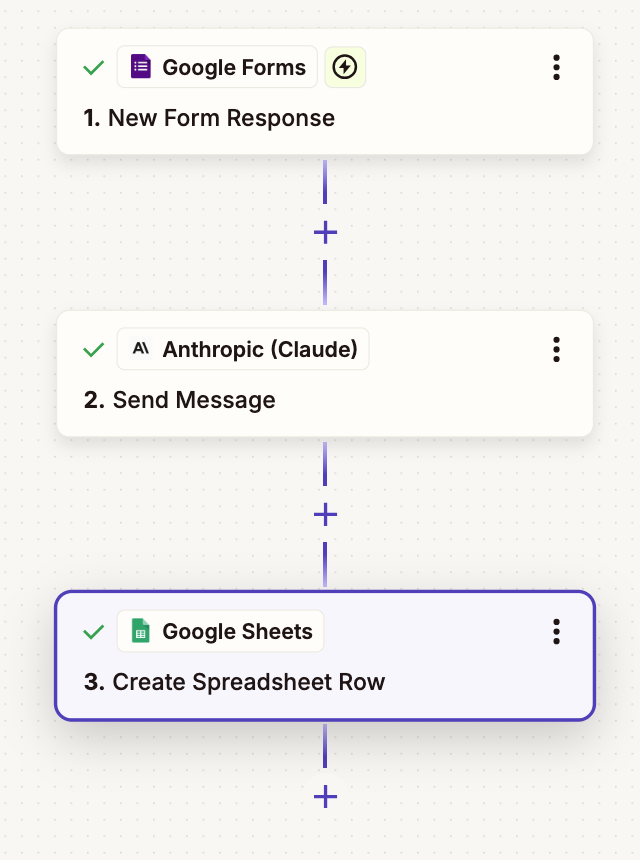
Workflow of integrating Google Forms with Claude and Google Sheets via Zapier. New form responses are sent to Claude for analysis, then results are added as a row in a Google Sheet.
No-Code Automation with Zapier: Zapier is an automation platform that lets you connect thousands of apps without coding. Notably, it supports Anthropic Claude as an action in workflows. Using Zapier, HR teams can set up triggers (like a new form submission, or a new row in a spreadsheet) that send data to Claude, then take Claude’s output and put it wherever needed. For example, imagine you use a Google Form for job applications – you can have each new submission automatically sent to Claude for analysis, and the AI-generated insights or scores recorded back into a Google Sheet.
Zapier’s own tutorial showcases this: connecting Google Forms → Claude → Google Sheets in a Zap that instantly analyzes responses and adds structured AI feedback. In an HR context, this could mean every time a candidate applies (via a form or ATS that can trigger a webhook), Claude evaluates their answers or resume and logs a summary/scoring in a sheet for recruiters to review. This kind of Claude HR workflow can save immense time on data entry and first-round filtering. Zapier provides a user-friendly interface to set this up, and once running, the process is fully automated.
Claude + Google Sheets (or Excel): If your team works a lot with spreadsheets (e.g., tracking candidates in Google Sheets or Excel), Claude can be integrated to work with that data. Anthropic offers a “Claude in Excel” solution as well, indicating that you can use Claude’s API directly within Excel for certain tasks. A simpler approach via Zapier is: whenever you add a new candidate row in a sheet, trigger Claude to fill in analysis in another column.
For instance, you add a candidate’s basic info and resume text to a row, and Claude populates fields like “Skills Match Score” or a brief comment. Conversely, you could have Claude bulk-analyze rows of data. The key advantage is turning your spreadsheet into a smarter tracker that doesn’t just hold data but also interprets it. Always double-check the outputs, but this integration can turn a basic Google Sheet into a mini ATS powered by AI.
Integrating with Applicant Tracking Systems: Many ATS platforms now explore AI integration. In fact, some modern ATS like Manatal have built-in Claude integration – allowing users to send data to Claude to generate content such as in-depth candidate summaries, personalized outreach emails, or interview analysis directly from the ATS interface. If your ATS doesn’t have native Claude support, you may still integrate via API or Zapier.
For example, if your ATS can send out a trigger when a candidate moves to a certain stage, you could catch that in Zapier and send the candidate’s details to Claude for processing. Imagine automatically generating a personalized email to a candidate who was just shortlisted – the ATS triggers Claude to draft the email, perhaps referencing something from their resume (e.g., “we were impressed by your project at XYZ company”). Or use Claude to analyze all candidates in a requisition and flag the top matches in a custom field.
To set up such integration practically, check if your ATS has Zapier connectors or open APIs. Many popular systems (Greenhouse, Lever, Workable, etc.) allow data to be pulled or pushed. By using Claude’s API (via an API key), a developer or even a tech-savvy HR ops person can connect the dots so that ATS data flows into Claude and back. For example, when a new resume is added, use an API call to send the text to Claude and receive a structured summary, then attach that to the candidate’s profile in the ATS.
Other integrations: Beyond these, Claude can connect with communication tools. HR teams have used workflows where high-scoring candidates trigger a Slack message to hiring managers, or Claude drafts a Calendly invite email for candidates who pass a threshold. The possibilities are vast: from automating reference-check summaries to drafting onboarding plans for new hires (once they’re marked as hired in your system).
The overarching idea is that Claude becomes a background assistant, working within your existing systems. By connecting Claude with HR software, you ensure AI insights are not siloed – they directly inform your recruiting pipeline in real time. This level of integration can turn a collection of tasks into a cohesive, intelligent workflow, with Claude doing the heavy lifting on analysis and generation.
Implementation note: When integrating at this level, be mindful of Claude’s usage limits (daily message limits on certain plans, and token limits for context size). In high-volume recruiting, you might hit those limits, so plan accordingly – perhaps summarizing batches of resumes rather than each one individually if volume is very high. Also, always secure candidate data in transit; use encryption and follow compliance guidelines (especially if sending data through external services).
Best Practices and Example Prompts for Claude in HR
Using Claude effectively requires not just plugging it in, but also communicating with it clearly. HR AI use cases often hinge on well-crafted prompts that tell the AI exactly what you need. Here are some practical tips and Claude prompt examples for common HR tasks:
- Resume Screening Prompt: “You are an HR assistant helping screen candidates. I will provide a job description and then a candidate’s resume. For each resume, summarize the candidate’s qualifications, and identify strengths or gaps relative to the job requirements. Finally, give a recommendation: ‘Strong fit’, ‘Possible fit’, or ‘Low fit’.” – This prompt sets up Claude to act as a screening analyst. You would paste the job description first, then each resume as a separate message. Claude will then output a tailored summary for each resume, highlighting key points (e.g., “Strengths: 5 years in relevant roles, has required certification; Gaps: no management experience which is preferred”). This helps you quickly grasp each candidate’s profile.
- Job Description Draft Prompt: “Draft a job description for the role Product Marketing Specialist. Our requirements: 3+ years marketing experience, strong writing skills, familiarity with SEO and product launches. Key responsibilities: manage go-to-market plans, create marketing content, coordinate with product and sales teams. Company tone: professional and inclusive. Include a brief company intro and diversity & inclusion statement at the end.” – Claude will produce a multi-paragraph job description covering an overview, responsibilities, requirements, and likely a bit about the company culture (since you asked for it). You can then edit specifics as needed. This prompt ensures the AI has all the pieces (role, requirements, tone) to generate a solid first draft.
- Interview Questions Prompt: “Generate a list of 5 interview questions for a Software Engineer (Backend) role focusing on problem-solving, teamwork, and knowledge of cloud computing. Provide a brief note on what a good answer might include for each.” – This instructs Claude to not only create questions but also give the interviewer guidance on expected answers. For instance, Claude might output: Q1. “Describe a challenging coding problem you solved – what was the problem and how did you approach it?” (Good answer: Talks through steps clearly, mentions debugging and collaboration), and so on. This is extremely useful for interviewers to have in hand, especially if they are not experienced in technical interviewing. It ensures consistency in what you’re asking different candidates.
- Candidate Rejection Email Prompt: “You are a hiring team assistant. Write a polite, empathetic rejection email to a candidate Jane who interviewed for the Sales Associate position. Encourage them to apply for future openings and mention one positive aspect of their application (e.g. strong communication skills) to personalize it.” – Communicating with candidates is crucial for employer brand. Claude can draft thoughtful emails for various scenarios: rejections, moving to next round, offer letters, etc. Here, the prompt guides Claude to produce a kind rejection note that still leaves a good impression. Always double-check these communications for tone and adjust any specifics (like names and roles), but AI can save you from writer’s block especially when you have many similar emails to send out.
- Interview Summary Prompt: “Summarize the following interview transcript between the interviewer and candidate for a Project Manager role. Highlight the candidate’s relevant experience, any technical methodology they mentioned (like Agile, Scrum), and their answer to the teamwork question. Conclude with a recommendation on whether to move forward based on the discussion.” – After you paste in the transcript text, Claude will generate a concise summary. This is useful to share with a hiring panel or to remind yourself later. The prompt explicitly asks for certain highlights (experience, methodologies, teamwork answer) so those don’t get lost. The AI’s final recommendation (which you may or may not follow) can offer perspective; maybe it noticed a hesitation or particularly strong answer you want to revisit.
When using these prompts, keep in mind a few best practices: be specific with your instructions, provide context (like job descriptions or snippets of resumes) whenever possible, and define the format of the output if you need it a certain way (bullet points, numbered lists, etc.). Claude is quite adept at following directions – for example, if you say “return only the integer score, nothing else” in a scoring prompt, it will do exactly that. Leverage that precision to make post-processing easier (like you can directly take a score from Claude’s output and put it into a spreadsheet).
Finally, always combine Claude’s assistance with human judgment. AI can turbocharge your HR processes – it can scan faster, write faster, and never gets tired – but it doesn’t have the nuanced understanding of your team culture or the human intuition about people (at least, not yet!). Use Claude to handle the heavy lifting of analysis and initial drafting, freeing you to focus on the human touch: building relationships with candidates, making the final calls, and adding the personal nuance where it matters. That synergy of AI efficiency and human empathy is where hiring truly becomes smarter and more effective.
Conclusion
Claude is a powerful ally for HR teams looking to modernize and streamline their recruitment process. From resume screening with AI that rapidly filters top talent, to auto-generating polished job descriptions, to creating insightful interview questions and summaries, the use cases are rich and varied.
Companies report significant efficiency gains – reducing time spent on drudge work by up to half – and improvements in consistency and personalization by using Claude throughout the hiring cycle. Importantly, integrating Claude with everyday HR tools (ATS, forms, spreadsheets) means these AI capabilities blend into your workflow rather than adding complexity.
While the benefits are clear in terms of speed and data-driven decisions, one must implement AI thoughtfully. Ensure fairness (AI should be a tool to reduce bias, not inadvertently amplify it), maintain data privacy, and stay aware of Claude’s limits (like context size and message quotas) in high-volume scenarios.
Always keep a human in the loop for critical judgments – AI can recommend or draft, but humans should decide and finalize.
In summary, Claude for recruitment can handle the grunt work of screening CVs, parsing resumes, writing job content, and evaluating interviews, enabling HR professionals to focus on strategy and personal connection. These HR AI use cases are not just theoretical; even leading AI companies use Claude daily in their hiring, and no-code solutions make it accessible to teams without developers.
By following the step-by-step workflows and prompt tips provided, HR teams (beginner or intermediate with tech) can implement Claude in their operations today.
Embrace the collaboration between AI and HR – it might just transform your hiring process into a more efficient, insightful, and candidate-friendly experience. The future of recruitment is here, and it’s powered by AI assistants like Claude.