

Keyword clustering is the process of organizing keywords into related groups based on search intent and semantic relevance. Instead of dealing with a disorganized list of terms, clustering lets you identify themes so you can create targeted content that ranks for multiple related queries.
This helps avoid SEO pitfalls like keyword cannibalization (competing pages targeting similar terms) by consolidating topics into one authoritative piece. It also aligns with how modern search engines understand topics; Google’s algorithms (e.g. BERT, RankBrain) recognize semantically related queries as part of the same topic cluster.
Using AI to automate keyword clustering can save enormous time while yielding more meaningful groupings than simple spreadsheet filtering. Claude – an advanced large language model by Anthropic – is especially suited for this task. Claude has a very large context window (tens of thousands of tokens in the latest versions) and excels at understanding language and intent across multiple languages.
SEO professionals have found that Claude’s strong reasoning ability often produces insightful clusters and category suggestions that outshine manual methods or even other AI tools. In fact, one strategist noted that Claude “understands intent more than ChatGPT” when analyzing search queries. With Claude, you can feed in huge keyword lists (even thousands of keywords) and get well-structured clusters in seconds, which would be tedious to do by hand.
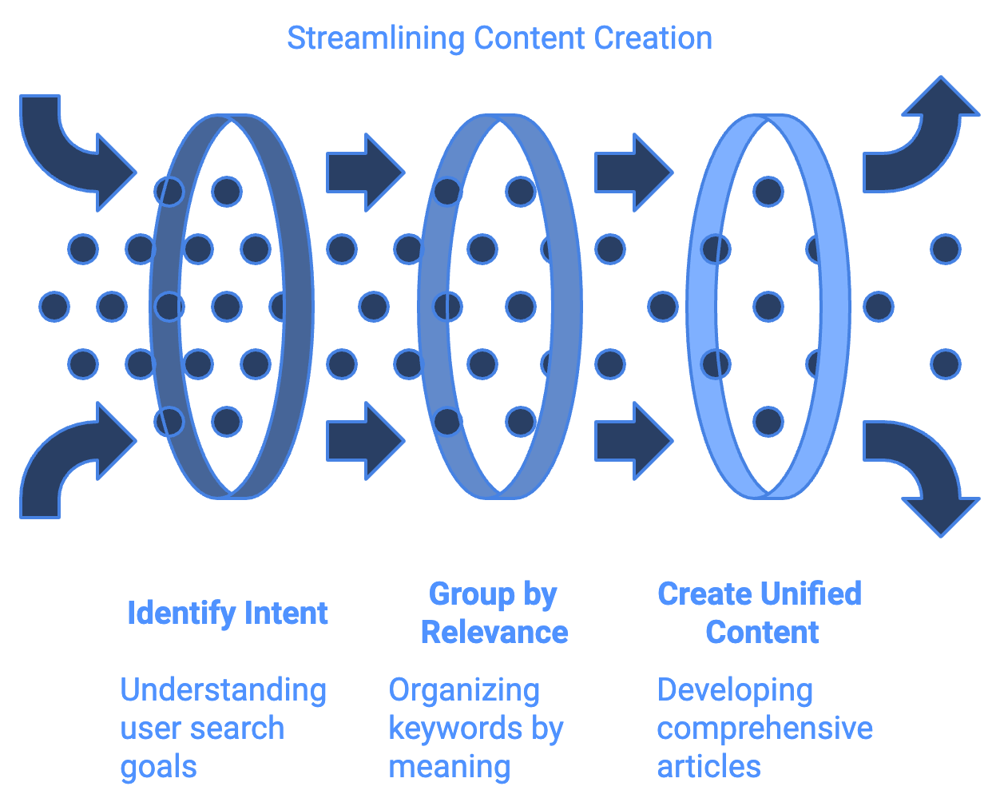
In the following guide, we’ll walk through how to leverage Claude for keyword clustering, both via the Claude.ai chat interface and the Claude API. We’ll cover practical workflows for different SEO scenarios – blog SEO (pillar pages and topic clusters), e-commerce SEO (category/subcategory and product keyword grouping), and local SEO (geo-targeted keywords and service variations).
You’ll also see multilingual examples (English, Spanish, Arabic) to understand how clustering and search intent can shift across languages. Throughout, we’ll include example prompts, JSON outputs, cluster tables, and even visual diagrams to illustrate the techniques. Let’s dive in.
Using the Claude.ai Interface for Keyword Clustering
The simplest way to get started is by using Claude’s web interface (Claude.ai), which provides a chat-based environment.
This method is great for manual clustering of small to medium keyword lists or for experimenting with prompts interactively. Claude can interpret your instructions and output clusters in a readable format. Here’s how to do it step by step:
Prepare Your Keyword List: Gather the keywords you want to cluster. These could come from your keyword research tools (Ahrefs, SEMrush, Google Keyword Planner, etc.) or a CSV export. Clean the list by removing duplicates and very irrelevant terms.
If you have metrics like search volume or difficulty, you can include them for context, but for basic clustering just the keyword phrases are enough. For example, let’s say we have a list of 10 keywords about coffee:
["how to make coffee", "best coffee brewing methods", "french press coffee guide", "coffee shop near me", "Starbucks locations", "coffee brewing tips", "local coffee stores", "coffee making techniques", "best coffee beans", "buy coffee online"]Notice this list mixes informational queries (how to brew coffee) with local/commercial queries (finding coffee shops or buying coffee).
Start a New Chat in Claude.ai: Log in to the Claude.ai interface (you may need an Anthropic account). Open a new chat conversation. Claude’s interface can handle large inputs, but if your keyword list is extremely long (hundreds or thousands of lines), you might hit limits on the free version. In those cases, consider splitting the list into chunks or using the API method (covered later). For most moderate lists, you can paste the keywords directly or attach them as a text file.
Craft a Clear Clustering Prompt: The key to getting useful output is instructing Claude what criteria to use for clustering and how to format the result. In the chat prompt, be explicit about grouping by topic/intent and ask for concise cluster names. For example, you might write:
You are an expert SEO analyst. Group the following keywords into clear clusters based on their topic and search intent.
- Provide a short descriptive name for each cluster (e.g. what the theme is).
- Ensure keywords with similar meaning or user intent are in the same group.
- If some keywords have a different intent (e.g. informational vs local), they should be in separate clusters.
- Output the clusters in a list or table, listing the cluster name and the keywords under it.

Keywords:
how to make coffee; best coffee brewing methods; french press coffee guide; coffee shop near me; Starbucks locations; coffee brewing tips; local coffee stores; coffee making techniques; best coffee beans; buy coffee online
This prompt gives Claude a role (“expert SEO analyst”) and specific instructions: group by semantic meaning and intent, name each cluster, keep similar intents together, and present the output clearly.
Notice we included examples in the instructions (like mentioning informational vs local intent) – this helps Claude understand how to differentiate groups. It’s also helpful to list the keywords in a clear format (separated by semicolons, bullets, or line breaks) so Claude can easily parse each term.
Review Claude’s Output: After sending the prompt, Claude will process the keywords and return clusters. For the coffee example, Claude might respond with something like:
Home Coffee Brewing – how to make coffee; best coffee brewing methods; french press coffee guide; coffee brewing tips; coffee making techniques; best coffee beans Coffee Shops & Local – coffee shop near me; Starbucks locations; local coffee stores Buying Coffee Online – buy coffee online Claude has created three clusters here, each with a clear theme:
Home Coffee Brewing (informational queries about making coffee) Coffee Shops & Local (queries about finding coffee shops, local intent) Buying Coffee Online (an e-commerce intent query by itself)These groupings make sense: the first cluster addresses how to brew coffee (likely a blog or guide topic), the second is about finding coffee shops nearby (local intent), and the third is transactional (purchasing coffee online). If the output was provided in plain text, you can easily turn it into a table for clarity:
ClusterKeywords Home Coffee Brewinghow to make coffee; best coffee brewing methods; french press coffee guide; coffee brewing tips; coffee making techniques; best coffee beansCoffee Shops & Localcoffee shop near me; Starbucks locations; local coffee storesBuying Coffee Onlinebuy coffee online Table: Example clustering output from Claude’s interface for a set of coffee-related keywords. Each cluster groups keywords by similar intent and topic.
Refine and Iterate if Needed: It’s possible Claude’s first attempt isn’t perfect. You might see a keyword that you feel belongs elsewhere or a cluster that’s too broad. One advantage of the Claude.ai interface is that you can have a dialogue. If something looks off, you can reply in the chat with follow-up instructions.
For example, “These are great, but can you split the Home Coffee Brewing cluster into two groups: one for brewing techniques and one for coffee bean choices?” Claude will then adjust the clustering based on your new guidance.
This iterative refinement is powerful – you can keep challenging Claude or adding criteria (like “also indicate the primary search intent for each cluster”) and it will update the output. SEO experts often go through a few rounds of tweaks to get clusters that feel right. In one case, an analyst improved results by iteratively pasting Claude’s output back into the prompt and asking it to refine the grouping criteria.
Also, be mindful of Claude’s mode and limits on the web UI. Claude sometimes has a “Concise” mode – for clustering tasks, you’ll usually want the full detailed output, so ensure it’s providing the complete answer.
If you have a very large list that the interface can’t handle at once (the free Claude 2 chat may have a daily message limit or context size limits), break the list into smaller batches (e.g. 200 keywords at a time), cluster each, and then you can even ask Claude to merge or reorganize those cluster outputs into a final result. Claude’s large context window means it can handle reading those intermediate results and combining them. Just remember that extremely large jobs might require the API and a paid plan.
Leverage Claude’s Understanding of Intent: One major advantage of using Claude is its understanding of search intent. You can explicitly ask Claude to label the intent for each cluster or to ensure clusters do not mix intents. For example, in our prompt we hinted at separating informational vs local intents. Claude’s output inherently did that (as seen by separate clusters for brewing info vs local shops).
If you want to be sure, you could structure the prompt to say: “For each cluster, also specify the dominant search intent (Informational, Transactional, Navigational, or Local).” Claude might then output something like Home Coffee Brewing – (Informational) and Coffee Shops & Local – (Local Intent) etc.
This kind of SERP intent breakdown for each group ensures you’ll align content types accordingly (e.g. create an informative blog for an informational cluster, a store-finder page for a local intent cluster, etc.). Claude’s ability to correctly sense intent is quite robust – users report it often matches what a human SEO would conclude. Still, always do a sanity check by looking at actual Google results for a sample keyword in each cluster to confirm that the intent grouping holds up.
By using the Claude.ai interface in this way, you can interactively create keyword clusters with minimal technical effort. It’s an excellent approach for clustering tens or hundreds of keywords and developing content ideas on the fly. However, if you have very large keyword datasets (hundreds to thousands of keywords) or want to automate the process and integrate with your workflow, you’ll likely prefer using the Claude API as described next.
Using the Claude API for Batch Keyword Clustering
For scaling up, Claude’s API allows you to process large volumes of keywords and get structured outputs (like JSON or CSV) that can feed into your SEO tools or spreadsheets. This method is more technical – you’ll need an API key and maybe some coding or Google Sheets knowledge – but it unlocks Claude’s full potential for batch clustering, including integration with other data (search volume, etc.) and exporting results.
Step 1: Get API Access. Sign up for an Anthropic Claude account that provides API access. Once you have access, obtain your API key from the Claude Console. There may be free tiers or trial tokens, but heavy usage will require a paid plan. (Clustering thousands of keywords is usually cheap, though – one case reported clustering ~100 keywords for about $0.04 in API costs.) With the API, you can choose models like "claude-2" or newer versions; the latest models often have the largest context windows and best performance. Ensure you know the model’s context limit (e.g. Claude 2 can handle up to ~100K tokens in theory, which is huge – in practice, you might input entire competitor keyword lists or very large CSVs).
Step 2: Format Your Prompt for the API. When sending a prompt to the Claude API, you’ll structure it similarly to the chat prompt, but you have the freedom to be even more explicit about output format since you’ll be processing it programmatically. A good practice is to request JSON output so that it’s machine-readable. For example, you might send a user message like:
{
  "prompt": [
    { "role": "system", "content": "You are an expert SEO keyword clustering assistant." },
    { "role": "user", "content":
"Group the following keywords into clusters based on topic and intent. Provide the output in JSON format, with each cluster as a key and an array of keywords as the value. Use short descriptive cluster names as the keys. Only output valid JSON and nothing else.

Keywords:
how to make coffee
best coffee brewing methods
french press coffee guide
coffee shop near me
Starbucks locations
coffee brewing tips
local coffee stores
coffee making techniques
best coffee beans
buy coffee online"
    }
  ]
}
(The above JSON shows how you might structure the API call’s message payload. We set a system role for context, then the user content includes instructions and the keyword list. We explicitly ask for JSON output.)
Step 3: Call the API and Get Results. Using your preferred method (HTTP request, SDK, or a Google Sheets function), send the prompt to Claude. If using Python, you’d use the Anthropic SDK or just requests to POST to the API endpoint with your prompt. If coding isn’t your preference, an easier route is the Claude for Sheets add-on, which allows you to call Claude from Google Sheets with a formula. For instance, after installing the extension and plugging in your API key, you can use a formula like =CLAUDE("Group these keywords...JSON format... Keywords: ...") in a cell. This will return Claude’s answer right into your spreadsheet cell (it may spill into multiple cells if it’s a table or JSON – Google Sheets can parse JSON with plugins, or you might get it as a single text blob you then process). The Claude for Sheets integration essentially lets you prompt engineer at scale in a spreadsheet, which is very handy for SEO folks comfortable in Excel/Sheets.
Claude’s response via API should follow your requested format. In our example, you’d get a JSON string like:
{
  "Home Coffee Brewing": [
    "how to make coffee",
    "best coffee brewing methods",
    "french press coffee guide",
    "coffee brewing tips",
    "coffee making techniques",
    "best coffee beans"
  ],
  "Coffee Shops & Local": [
    "coffee shop near me",
    "Starbucks locations",
    "local coffee stores"
  ],
  "Buying Coffee Online": [
    "buy coffee online"
  ]
}
This JSON is easy to work with. You can write a small script to convert it into a CSV file where each row is keyword,cluster_name or to generate summary reports (like number of keywords per cluster, total search volume per cluster if you included those metrics, etc.). If you used Google Sheets, you might copy this JSON output into a cell and use a JSON parsing function or add-on to transform it into a sheet format.
Alternatively, you could adjust the prompt to have Claude output a CSV directly (e.g. “Output as a two-column CSV with columns ‘Keyword’ and ‘Cluster’”). Claude can do that as well – it might produce a table in Markdown or CSV text. However, JSON is generally less prone to formatting ambiguities.
Step 4: Post-process and Validate. Programmatic results still need the human touch for validation. Quickly scan through the clusters Claude returned. Are the cluster names sensible and distinct? Are any clusters too large or too mixed? If you notice issues, you can refine your prompt and run it again.
For example, if you saw a cluster that should be split, modify the instructions (maybe add “do not group keywords that have different purchase intent, even if words overlap” or similar). In one user’s experience, refining the prompt after seeing initial output led to “vastly more contextual” clusters that felt like a human organized them. Since the API allows rapid iteration, you can loop through prompt tweaks quickly until the clustering meets your quality bar.
Step 5: Integrate with Your Workflow. Once you have a solid clustering, put it to use. If it’s for content planning, you might import the clusters into a project management tool or content calendar (each cluster could correspond to a planned article or page). If it’s for site architecture (like category pages), share the clusters with your web dev or e-commerce team as guidance for navigation and linking. The beauty of having this in a structured form is you can sort and filter easily.
For example, if you appended search volumes to each keyword in the prompt or after, you can sum volumes per cluster to prioritize which clusters (topics) are most valuable. One advanced tip: Claude can even do those calculations for you within the prompt – as shown by an SEO experiment where a prompt asked Claude to calculate total search volume and even a priority score per cluster.
Claude was then able to output a table of clusters with aggregated metrics and recommendations. That goes beyond basic clustering into full keyword analysis. You might not always need that, but it’s good to know Claude can handle it, especially via API where large data can be processed.
Finally, remember that Claude is multilingual, so you can use the API to cluster keywords in languages other than English just as effectively. According to Anthropic’s own benchmarks, Claude’s performance in languages like Spanish and Arabic is very close to its English performance (on some evaluation tasks ~96–98% as effective). We’ll explore multilingual clustering more later, but the API approach remains the same – just input keywords in the target language and perhaps specify the language in the instructions for clarity.
Keyword Clustering for Blog SEO (Pillar Pages & Topic Clusters)
One of the most common uses of keyword clustering is to plan blog content around topic clusters and pillar pages. The idea is to organize content into a hub-and-spoke model: a pillar page (comprehensive guide on a broad topic) with multiple supporting articles that delve into subtopics, all interlinked. This structure signals to search engines that you have authoritative coverage of a topic. Claude can assist in both identifying these clusters and even suggesting what the pillar and subtopic pages should be.
When using Claude for blog SEO clustering, you typically start with a broad topic in mind. For example, suppose your site is about digital marketing and you want to create a pillar page on “Digital Marketing Strategies.” You’ve gathered a list of related keywords via research.
These might include terms like “digital marketing strategy”, “SEO techniques for 2025”, “social media marketing plan”, “content marketing strategy tips”, “email marketing best practices”, “PPC advertising strategy”, “digital marketing for small business”, etc. That’s a mix of subtopics under the broad umbrella.
How to cluster for a pillar page:
Identify Pillar vs. Supporting: Ask Claude to separate keywords into one main cluster (the pillar topic) and several thematic sub-clusters. In your prompt, you can say: “Group these keywords into a topic cluster with one pillar page topic and several supporting article topics. The pillar cluster should cover the broadest term, and supporting clusters should each cover a specific subtopic or angle.
Also indicate how they relate.” Claude is quite good at recognizing which term is the broad one (often the highest search volume head term) versus which are more niche subtopics. In our example, “digital marketing strategy” is clearly the pillar, and things like “SEO techniques for 2025” could be a supporting cluster under an “SEO Strategy” theme.
Include Search Intent: Blog content is usually informational or at most “commercial investigation” intent. Claude will likely cluster by subtopic (SEO vs Social vs Email marketing, etc.), but you also want to ensure any different intent queries are handled.
For instance, if your list accidentally included a purely transactional keyword like “digital marketing agency pricing” (which is someone looking for a service, not information), Claude might isolate that as its own cluster. You might decide that query doesn’t belong in a blog at all. So pay attention if Claude creates an oddball cluster – it could be highlighting an intent mismatch. Often, though, your blog-focused keyword list will already be mainly informational.
Prompt Example (Blog Clusters):
"You are an SEO content strategist. I have a list of keywords related to digital marketing. Please organize them into a content cluster strategy: identify the best pillar page topic and 5-8 supporting article topics.
- The pillar should cover the broad overarching topic.
- Supporting clusters should group keywords by specific subtopics (e.g. SEO, social media, etc.), each of which could be a blog post.
- Provide a short name for each cluster and list the keywords under it.
- Also, for each cluster, note the primary search intent (informational or otherwise) and suggest the content format if relevant (e.g. "guide", "checklist", "case study").

Keywords:
digital marketing strategy; SEO techniques 2025; social media marketing plan; content marketing strategy; email marketing best practices; PPC advertising strategy; digital marketing for small business; how to create a digital marketing plan; content calendar ideas"
Claude might output something like:
Pillar – Digital Marketing Strategies (Guide) – digital marketing strategy; how to create a digital marketing plan; digital marketing for small business (Intent: Informational – broad overview guide)
SEO Strategy – SEO techniques 2025 (Intent: Informational – tips list or guide)
Social Media Marketing – social media marketing plan (Intent: Informational – how-to/plan outline)
Content Marketing – content marketing strategy; content calendar ideas (Intent: Informational – guide with examples)
Email Marketing – email marketing best practices (Intent: Informational – best practices list)
PPC Advertising – PPC advertising strategy (Intent: Informational – how-to or strategy guide)In this hypothetical output, Claude correctly identified “Digital Marketing Strategies” as the pillar encompassing the general and high-level queries. It then grouped other keywords into intuitive subtopics: SEO, Social Media, Content, Email, PPC – all of which are facets of digital marketing that likely warrant their own articles. It even suggested content formats (we asked for that): e.g. a guide for the pillar, checklists or how-tos for subtopics if applicable.
Use Clusters to Plan Content: Now you have a clear content plan. The pillar page (perhaps titled “Ultimate Guide to Digital Marketing Strategies”) will link out to all the supporting pieces. Each supporting article (e.g. “SEO Techniques for 2025”) will link back to the pillar and possibly to each other where relevant. Claude’s clustering essentially gave you the blueprint. As a bonus, you can ask Claude to elaborate on each cluster – for example, generate an outline for each blog post, or suggest what subheadings to include, etc., but that moves into content generation. For clustering purposes, we have what we need.
Ensure Topical Coverage: Review if any important subtopic is missing or if any cluster should be split. Maybe Claude put “content marketing strategy” and “content calendar ideas” together, which makes sense, or perhaps you have enough keywords that “Content Marketing” could even be split into two posts (strategy vs calendar/tactics). You have the flexibility to adjust. Claude’s suggestions are a starting point; you as the marketer decide the final cluster boundaries. The goal is to cover each cluster with one comprehensive piece rather than many thin pieces, exactly as keyword clustering theory advises.
Internal Linking Plan: Claude can also help in planning the internal links of the cluster. You might prompt it: “Given these clusters, suggest an internal linking strategy (which pages should link to which using what anchor text).” This goes a step further into SEO implementation.
For example, Claude might say the pillar should link to each subtopic with anchor text like “SEO techniques” etc., and each subtopic article should link back to the pillar using a variation like “digital marketing guide”.
It might also suggest cross-links among subtopics if there’s a relation (like mention the email marketing article should link to the content marketing article when discussing content newsletters). This ensures your cluster is tightly interwoven, boosting topical authority.
In summary, Claude is extremely useful for blog SEO clustering: it handles the semantic grouping, labels clusters with intuitive names, identifies search intent, and can even propose content outlines or linking structures. By using Claude’s output, you can accelerate building a robust content hub (pillar page + cluster) that covers your target topic in depth. Many SEO teams use Claude for this purpose because it quickly transforms a keyword dump into an actionable content roadmap.
Keyword Clustering for E-Commerce SEO (Categories, Subcategories & Products)
For e-commerce websites, keyword clustering helps inform site architecture and product page optimization. Instead of pillar pages, you’re dealing with category pages, subcategory pages, and sometimes content pages (like buyers’ guides) that support product sales. Claude can group keywords that relate to the same product category or user intent, ensuring your site has well-defined sections targeting each cluster of shopping intent.
Clustering approach for e-commerce:
Group by Product Type or Category: Start by feeding Claude all your product-related keywords. These could include generic category terms, specific product types, and modifiers (brand names, attributes like color/size, “best”, “cheap”, etc.). In the prompt, instruct Claude to cluster keywords into groups corresponding to product categories or subcategories.
Essentially, you want each cluster to map to either a category page on your site or a distinct user need that might be a landing page. For example, if you run an online shoe store, your keywords might cluster into groups like “Running Shoes”, “Dress Shoes”, “Sneakers”, “Boots”, etc., based on the product type. Within “Running Shoes” you might even get sub-clusters by brand (Nike, Adidas) or by user segment (men’s, women’s), depending on how granular your list is.
Include Commercial Modifiers: E-com keywords often have adjectives like “cheap”, “best”, “discount”, or phrases like “under $50”, “2025 model”. These indicate commercial intent but different angles – “best” implies comparison content or category page listing top products, “cheap” implies a user looking for budget options, etc. Claude can pick up on these and either separate them into different clusters or include them under one cluster with a note.
For instance, in a “Running Shoes” cluster, it might include “best running shoes 2025” and “cheap running shoes” together since both are about running shoes. But are those actually best together? It depends – SEO-wise you might target them separately (one page for best, one for cheap).
You can decide to have Claude split by intent if desired: “Group keywords by product type, and further separate clusters if the intent is significantly different (e.g., ‘best’ vs ‘cheap’ might be separate clusters under the same category).” This ensures you don’t force different intent into one cluster – remember, mixing disparate intents in one page is a common mistake.
Claude can help avoid that by recognizing, for example, that “protein powder for weight loss” vs “protein powder for muscle gain” are two different user intents even though the product is the same (one cluster might be weight-loss-oriented protein, another muscle-gain-oriented protein).
Cluster by Attributes When Useful: E-commerce sites also have facets like brand, color, size. Usually, you don’t create separate pages for each color unless it’s highly searched, but for SEO you might create pages for top brands or top attributes. If your keyword list contains brand names, Claude might cluster those separately.
E.g. “Nike running shoes” might become its own cluster distinct from “Adidas running shoes”. That could tell you to have brand category pages or at least dedicated sections. Similarly, if people search by usage – e.g. “running shoes for trail” vs “running shoes for road” – those could be clusters (trail running shoes vs road running shoes). Essentially, Claude will reveal the natural grouping users expect, which should correspond to how you organize your categories and filters.
Prompt Example (E-commerce Clustering):
"You are an e-commerce SEO expert. Cluster the following keywords into groups for site content: each cluster should correspond to a product category or subcategory, or a distinct user intent.
- Name each cluster as a category/theme (e.g. 'Running Shoes - Men' or 'Running Shoes - Budget').
- Group similar product keywords together (including synonyms and plural/singular variations).
- Keep different intents separate: for example, informational queries like 'how to choose [product]' should not mix with 'buy [product]'.
- If applicable, create sub-clusters for major brand names or use-cases under a main category.
- Output the clusters in a clear list format.

Keywords:
running shoes; best running shoes 2025; cheap running shoes; Nike running shoes; Adidas running shoes; women's running sneakers; trail running shoes; running shoes for marathon; shoe size chart; buy running shoes online; running shoes under $100"
Claude might produce an output like:
Running Shoes – General – running shoes; running shoes for marathon; trail running shoes; women’s running sneakers
Running Shoes – Best/Reviews – best running shoes 2025
Running Shoes – Budget – cheap running shoes; running shoes under $100
Running Shoes – Brands – Nike running shoes; Adidas running shoes
Buying & Sizing Info – buy running shoes online; shoe size chartLet’s interpret that: The first cluster is a broad “Running Shoes” category – those keywords could be handled by your main running shoes category page (covering various types, including women’s, trail, etc., or linking to subpages). The second cluster isolates “best running shoes 2025” – indicating you might create a blog post or a category page section for “Best Running Shoes” (maybe a curated list).
The third cluster is about cheap/budget – maybe a page for “Affordable Running Shoes” or a filter on the category page. Fourth cluster groups brand-specific searches – you definitely might want brand category pages for Nike and Adidas running shoes. Fifth cluster captured some that are not product categories but related informational queries (“shoe size chart” or generic buying query).
Those might be content pieces (a guide on shoe sizing, etc.) rather than product listing pages. Claude essentially mirrored how an SEO might manually segment these: general category vs intent-specific sub-sections vs brand sections vs supporting info. This is incredibly useful when you have hundreds of product keywords; Claude can surface the patterns in user search behavior for you.
Visualizing E-commerce Clusters: It can be helpful to visualize the hierarchy of clusters, especially for a complex product category. Claude’s output can be turned into a tree diagram to represent main categories and sub-clusters. For example, consider an output for “Protein Powder” related keywords:
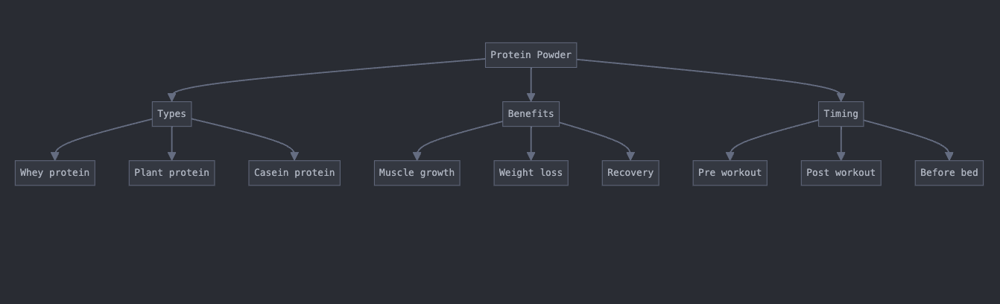
Example of an e-commerce keyword cluster hierarchy for “Protein Powder”. In this diagram, the main topic “Protein Powder” branches into three thematic clusters:
Types (different kinds of protein like whey, plant, casein), Benefits (user goals such as muscle growth, weight loss, recovery), and Timing (when to use it: pre workout, post workout, before bed). Such a structure could inform the website’s navigation and content. For instance, a supplement store might have subcategory pages for protein powder types (whey, plant-based, etc.), and create content sections or filter tags for benefits and timing (e.g. pages or guides on using protein for muscle gain or the best protein to take post-workout). This hierarchical clustering ensures the site covers all facets of the user’s interest in protein powders, each cluster addressing a distinct intent or need.
The above example shows how Claude’s clustering can guide an e-commerce site’s content strategy: ensuring that each major angle (product type, user intent, use-case) is addressed. It’s important to note that not every cluster will become a standalone page – some might be handled as filters or headings on a page. But identifying them means your content covers all relevant subtopics, which can improve rankings and user experience.
Category Page vs Content Page Decisions: Once you have clusters, you’ll need to decide what format each cluster should take on your site. Claude can help here too if you include guidance in the prompt or ask after clustering: “For each cluster, suggest whether it should be a category page, a sub-category page, or an informational page.” For instance, in the running shoes example, Claude might say “Running Shoes – General” should be a main category page, “Running Shoes – Best” could be a blog article or a curated category page, “Budget Running Shoes” could be a category filter or article, “Brands” suggests separate category pages for each brand, and “Buying & Sizing Info” suggests blog content or FAQ pages.
As an SEO, you ultimately decide based on search volume and business priorities (e.g. if “shoe size chart” has lots of searches, you might make a dedicated content page to capture that traffic and funnel to products). The clusters give you a clear map of user interests so you don’t overlook any significant content areas.
Avoiding Keyword Cannibalization: E-commerce sites often inadvertently target the same keyword on multiple pages (e.g. separate pages for “cheap running shoes” and “affordable running shoes”). If Claude clusters those together, that’s a sign they should perhaps be consolidated or at least closely coordinated. Clustering highlights where combining pages makes sense and where splitting is needed.
Use this to ensure each cluster is only targeted by one page on your site. For example, both “cheap running shoes” and “running shoes under $100” ended up in the same cluster – that’s good, you’d create one page targeting that concept rather than two competing pages.
In summary, Claude’s clustering for e-commerce SEO can inform site structure, category page optimization, and content needs around your products. It takes into account semantic similarities and search intent nuances in product queries. The result is a more organized site that addresses what shoppers are actually looking for, which can improve both SEO rankings (through better topical authority and reduced cannibalization) and conversion (by guiding users to the right page).
Always double-check clusters against your product catalog and analytics – make sure the clusters align with business realities (you might not carry a certain subcategory that users search for, which could indicate a product opportunity or a need to create a guide pointing to alternatives).
Keyword Clustering for Local SEO (Geo-Modified & Service Keywords)
Local SEO keyword clustering focuses on grouping searches that include location terms or are otherwise local-intent (like “near me” queries), as well as grouping the various services or products a local business offers.
If you operate in multiple cities or regions, you’ll want to cluster keywords by geography. If you offer multiple services, cluster by service type, and then possibly by location. Claude can help untangle these combinations, ensuring you cover all the geo-modified variations without creating redundant pages for every small variation.
Clustering approach for Local SEO:
Group by Location: If your keyword list includes city names, neighborhood names, or phrases like “near me”, a primary clustering dimension will be the location. For example, imagine a chain of clinics with keywords like “dentist in Los Angeles”, “dentist in San Diego”, “best dentist in LA”, “dental clinic NYC”, “dentist near me”, etc.
Claude can cluster all the Los Angeles-related queries together, the New York queries together, and so on. It might also create a separate cluster for the generic “dentist near me” type terms (since those are location-dependent on the searcher, not a specific city name).
In your prompt, you can specify: “Group keywords by city or area. If a keyword has ‘near me’, treat it as a separate intent for a local search from the user’s vicinity.” The output might be clusters named “Los Angeles Dental Keywords”, “New York City Dental Keywords”, “San Diego Dental Keywords”, and “General/Near Me Dental Queries”.
Group by Service/Product (within locations): If the business offers multiple services, you may further cluster within each location by service type. For instance, “emergency plumber Chicago” vs “commercial plumber Chicago” vs “residential plumber Chicago” could be separate clusters, all under the Chicago group. Claude can either do a two-level clustering (which might require a two-pass approach: first cluster by city, then within each cluster, cluster by service).
In the interface, you could simply include all combinations and see if Claude automatically separates them. Often, it will – it might output “Chicago – Emergency Plumbing”, “Chicago – Commercial Plumbing”, “New York – Emergency Plumbing”, etc., if it detects enough keywords to justify that. If not, you can run clustering hierarchically: filter your list by city first, or run one prompt per city to get service clusters in each.
Identify Intent Variations: Local queries can have implicit intents: Service discovery intent: “<service> in <location>” (user looking for a provider). Research intent: “best <service> in <location>”, “<service> <location> reviews” (user comparing options). Navigational intent: “<brand name> <location>” (looking for a specific business or directions). Immediate need: “emergency <service> <location>” (urgent intent). Questions: “how much does <service> cost in <location>” (informational but locally contextual).You can instruct Claude to cluster by these nuances.
For example, it might cluster all “best <service> in X” separately from basic “<service> in X”. Depending on how you plan to target them, that could be useful (you might create a “Top 10 best dentists in Los Angeles” page for the “best” queries, separate from your main “Los Angeles dentist” page). Claude’s understanding of these subtleties means it often does this on its own. If not, prompt it: “Separate generic service searches from ‘best’ or ‘top-rated’ searches, as those might be different content.”
Prompt Example (Local SEO Clustering):
"You are a local SEO specialist for a plumbing company. Cluster the following keywords into groups by city and intent. Each cluster should ideally correspond to a page on the site.

- First, group by city/area (keywords for the same city together).
- Within each city, distinguish general searches from specific intents like emergency or reviews.
- Also group any 'near me' queries separately, as those are generic local searches.
- Provide cluster names that include the location and category (e.g. 'Chicago Emergency Plumbing').
- List the keywords under each cluster.

Keywords:
plumber Chicago; emergency plumber Chicago; best plumbers in Chicago; plumber near me; plumbing services near me; Los Angeles plumber; 24 hour plumber Los Angeles; best plumbing repair LA; NYC plumbing services; New York City emergency plumber; plumber for water heater NYC; top-rated plumbers near me"
Claude’s output might look like:
Chicago – General Plumbing – plumber Chicago; plumbing services Chicago (includes generic city terms if any)
Chicago – Emergency – emergency plumber Chicago; 24 hour plumber Chicago
Chicago – Comparison/Reviews – best plumbers in Chicago
Los Angeles – General Plumbing – Los Angeles plumber; plumbing services LA
Los Angeles – Emergency – 24 hour plumber Los Angeles; emergency plumber Los Angeles
Los Angeles – Comparison – best plumbing repair LA
New York City – General Plumbing – NYC plumbing services; plumber NYC
New York City – Emergency – emergency plumber NYC; plumber for water heater NYC (the latter might be a specific service but local)
General – Near Me Searches – plumber near me; plumbing services near me; top-rated plumbers near meIn this clustering:
We see clusters for each target city (Chicago, LA, NYC) and within them separate clusters for emergency services vs general vs “best” (reviews). This suggests creating, for example, one page for “Plumber in Chicago” (covering general info about your Chicago service), another page for “Emergency Plumber Chicago” (targeting urgent needs), and maybe a blog or directory page for “Best Plumbers in Chicago” (if you were doing content marketing – or if it’s your own company, you might not make a “best of” list that includes competitors, so perhaps that cluster indicates users look for lists on third-party sites).
The “near me” queries are grouped in a General cluster without a city. These are tricky because “near me” results are very personalized. If you’re a single-location business, you can’t target “near me” universally – Google will serve whatever is geographically closest to the user. But if you have many branches, you ensure each branch page is optimized so it can rank when someone near that location searches “plumber near me.” Claude putting them in a separate cluster is a reminder that on-page, you might include phrases like “if you’re looking for a plumber near you, we have locations in X” or simply recognize that “near me” traffic will come via Google Maps/GBP rather than organic pages. In any case, clustering shows them separate since no specific city was mentioned.
Multilingual Local Clustering: In some regions, users might search in different languages for local services. For example, in parts of the US, Spanish queries like “dentista cerca de mí” (dentist near me) or in the Middle East, Arabic queries like “أفضل مطعم في القاهرة” (best restaurant in Cairo) are common. Claude can cluster these just as well.
You would likely separate clusters by language, because an English page vs a Spanish page will differ. We’ll discuss multilingual specifics next, but keep in mind to run clustering language-wise. If you mix languages in one prompt, Claude will usually cluster by language first anyway, since those keywords are obviously different vocabulary.
Using Clusters for Local Content Strategy: Once you have your local clusters, map them to pages. Typically:
Each city gets a location landing page (or service page if you offer one service). If multiple services in one city, you might have a city page and service sub-pages.
“Emergency” or 24-hour service might be a section on the city page or a separate page focusing on emergency cases (depending on how you design the site).
“Best [service] in [City]” might not be a page you create (unless you’re writing a blog post listing top providers), but it tells you the kind of content people look for – maybe you ensure your page has testimonials and “#1 in City” claims to capture those searching for top-rated providers.
“Near me” – ensure your Google Business Profile is optimized for those, since that’s mostly a maps listing game. But also ensure your site’s contact/location pages are strong.
Claude’s clustering helps ensure you don’t miss a category. For example, if you forgot to explicitly include “24 hour” in your keyword list, Claude might still cluster an “Emergency” group because it understands from “emergency plumber” that 24/7 service is a theme. This is great for uncovering content ideas: maybe you realize you should have a section of your page about 24-hour availability, even if you didn’t think of it initially.
Multilingual Keyword Clustering (English vs Spanish vs Arabic Examples)
SEO isn’t one-size-fits-all for language – user search behavior and intent can vary across languages. The good news is Claude is a multilingual AI and can cluster keywords in many languages effectively (Anthropic reports strong performance across widely spoken languages and even many low-resource ones). When clustering non-English keywords, the process is largely the same, but you should be aware of linguistic nuances.
Claude can seamlessly switch languages, but it helps to prompt in the language of the keywords or explicitly mention the language. For example, if you have a set of Spanish keywords, you might write your instructions in English but say “The keywords are in Spanish. Group them accordingly.” Claude will then output cluster names in Spanish by default (since it tends to respond in the language of the content given, unless told otherwise).
Example Scenario: Suppose we want to cluster keywords about “online learning courses” in English, Spanish, and Arabic to see how they might differ.
- English Keywords:
["online marketing course", "digital marketing certification", "social media marketing course", "SEO course online", "best online marketing courses"] - Spanish Keywords:
["curso de marketing digital", "mejor curso de marketing en línea", "curso de marketing en redes sociales", "certificación de marketing digital", "curso SEO online"] - Arabic Keywords:
["دورة تسويق رقمي عبر الإنترنت", "أفضل دورة تسويق رقمي", "دورة في التسويق عبر وسائل التواصل الاجتماعي", "شهادة التسويق الرقمي", "دورة تحسين محركات البحث عبر الإنترنت"](These Arabic terms correspond to similar meanings: online digital marketing course, best digital marketing course, social media marketing course, digital marketing certification, online SEO course.)
If we run Claude separately on each list (which is recommended, since mixing languages could confuse cluster naming), we might get:
- English Clusters: Digital Marketing Courses – (online marketing course; digital marketing certification; best online marketing courses) Specialized Marketing Courses – (social media marketing course; SEO course online) (Claude recognized “digital marketing” as a general category and grouped related terms together, while putting social media and SEO courses as specialized topics. It gave cluster names in English.)
- Spanish Clusters: Marketing Digital – Curso General – (curso de marketing digital; certificación de marketing digital; mejor curso de marketing en línea) Cursos Especializados (Redes Sociales y SEO) – (curso de marketing en redes sociales; curso SEO online) (In Spanish, we see a very similar breakdown. The cluster names are in Spanish. “Marketing Digital – Curso General” covers the broad digital marketing course queries, including the certification and “best course” query. The second cluster combines the social media marketing course and SEO course, labeling them as specialized courses. We might have separated SEO vs Social media, but given only one of each, Claude clustered them together under a general “specialized courses” bucket. We could prompt it to separate those if desired.)
- Arabic Clusters:دورة التسويق الرقمي الشاملة (Comprehensive Digital Marketing Course) – (دورة تسويق رقمي عبر الإنترنت; أفضل دورة تسويق رقمي; شهادة التسويق الرقمي)دورات تسويق متخصصة (Specialized Marketing Courses) – (دورة في التسويق عبر وسائل التواصل الاجتماعي; دورة تحسين محركات البحث عبر الإنترنت) (Claude provided cluster names and output in Arabic. The first cluster includes the general digital marketing course queries (including “best” and “certification”), and the second cluster covers the social media marketing course and SEO course as specialized topics. This mirrors the structure from English/Spanish.)
This example shows that across English, Spanish, and Arabic, the clusters ended up being conceptually similar. However, there are cases where clusters might differ across languages due to cultural or search habit differences. For instance, let’s consider a local SEO example: English speakers might use “near me” a lot, whereas Spanish speakers might be more likely to include the city name.
An English list for restaurants might have “best pizza near me”, while a Spanish list might have more of “mejor pizzería en [ciudad]”. Claude would cluster the English “near me” queries separately (because no specific city), whereas the Spanish ones would cluster by city name.
Another difference: certain topics might be more popular in one language than another, leading to more sub-clusters. For example, Arabic users might have multiple words for a concept (due to transliteration or dialects) which Claude might cluster together if it recognizes them as synonyms.
Claude’s Multilingual Capabilities: It’s worth noting that Claude has been tested to maintain high performance across languages like Spanish and Arabic. It can understand and group keywords with context just as it does in English. For multilingual SEO projects, you can use Claude to cluster keywords language by language. Ensure you generate cluster names and descriptions in the respective language for ease of use by native content teams. You might ask Claude to also translate cluster names if needed (e.g. “output cluster names in English, but keywords are Spanish”).
Intent Shifts Across Languages: Pay attention to how search intent might shift with language. Sometimes a direct translation might carry a slightly different intent. For example, an English query might be phrased as a question, whereas in another language a statement is used. “How to do X” in English versus “cómo hacer X” in Spanish – those are equivalent informational intents, so likely in the same cluster.
But consider something like “buy house” vs “house for sale” – different phrasing can hint at intent (one sounds like a buyer intent, the other could be a listing intent). In one language, one form might be common, in another, a different. Claude will cluster based on semantic meaning, so it should catch equivalences, but as an SEO you should review if the clusters align with how you want to target intent in each language market.
Separate Clustering by Language: Generally, cluster each language separately. You wouldn’t cluster English and Spanish keywords together because they’ll naturally form separate groups (one for each language). Even if you have a bilingual site targeting both, treat them as separate efforts, since content will be separate.
The exception might be if you’re doing cross-lingual analysis (not typical for SEO clustering – that’s more for research). Claude can do cross-lingual semantic grouping (it can recognize if an English and Spanish phrase mean the same thing), but in SEO context you usually wouldn’t merge them; you’d rather note that “X in Spanish corresponds to Y in English” for international SEO mapping. You could use Claude for that too – e.g. ask it to map Spanish keywords to their closest English counterparts – but that’s a different task.
Use Cases: If you have a multilingual site, use clustering to plan content in each language. For example, a travel site might cluster “cheap flights, flight booking, airfare deals” in multiple languages. You’ll discover if, say, German users search differently (maybe more brand name inclusion) vs French users (maybe more “pas cher” = cheap usage). Optimize content per cluster accordingly in each language. Claude’s output will help native speakers or translators understand how to structure the site’s content in that language.
In summary, Claude’s ability to cluster keywords extends effectively to Spanish, Arabic, and most other languages, enabling international SEO professionals to perform the same kind of analysis globally. It preserves the nuances of each language’s search behavior. Always combine the AI’s output with your knowledge of the local market – e.g. verify with native speakers or local SERP research if the clusters truly reflect how people search – but as a starting point, it’s incredibly powerful.
Conclusion
Creating SEO keyword clusters is a critical step for building an effective content strategy, whether it’s for a blog, an e-commerce site, or a local business. It allows you to cover topics comprehensively, match user search intent with the right pages, and avoid overlapping content. Claude, the AI by Anthropic, has proven to be a valuable ally in this process. By leveraging Claude’s natural language understanding and large-scale data processing:
- You save time that would otherwise be spent manually sifting and grouping hundreds of keywords.
- You gain semantic insights – Claude might surface groupings or intents you hadn’t thought of, thanks to its training on vast amounts of language data.
- You can handle scale – via the Claude API or Sheets integration, even thousands of keywords can be clustered and formatted into JSON/CSV for analysis, a task that would be prohibitively slow to do by hand.
- You maintain flexibility – through iterative prompting and refinement, you can adjust clusters to align with your specific needs or business logic, with Claude quickly recalculating as instructed.
From our exploration, we saw how to use the Claude.ai interface for an interactive clustering session and how to set up batch clustering with the API for larger jobs. We demonstrated clustering in multiple contexts (blog, e-commerce, local SEO) and languages, showing that the core principles remain the same: clearly instruct Claude on grouping criteria (topic, intent, etc.), and it will generate organized clusters complete with human-like labels and coherence.
As with any AI tool, remember that your oversight is important. Use Claude’s output as a starting draft for your keyword strategy. Then apply your expertise: merge or split clusters based on business goals, check real search results to validate intent groupings, and refine page plans accordingly. Claude excels at the heavy lifting of semantic analysis, but you provide the strategic direction.
In practice, many SEO professionals are already using Claude to streamline their workflow – from clustering keywords and mapping out content plans to even drafting content briefs for each cluster. By integrating these AI-generated clusters into your SEO process, you can move faster while maintaining (or improving) quality and thoroughness. Whether you’re creating a pillar page that ranks for hundreds of long-tails or structuring an e-commerce site’s categories, keyword clustering with Claude can give you a competitive edge.
Now it’s your turn: try out Claude with your own keyword lists. Start with a prompt template from this guide, watch the clusters materialize, and tweak as needed. With a bit of practice, you’ll develop a prompt style that consistently yields great results tailored to your niche. Harness Claude’s analytical power, and build those keyword clusters that will drive your SEO success!