
Artificial intelligence assistants are becoming daily partners for productivity – helping with writing, coding, project management, meeting notes, and more. A key factor in their usefulness is memory: how well the AI remembers context, user preferences, and past interactions.
In this article, we provide a deep, analytical comparison of Anthropic’s Claude and OpenAI’s ChatGPT memory features, focusing on real daily work scenarios. The goal is a neutral, documentation-style look at how each system handles memory, what that means for users, and when each approach is most suitable.
Understanding AI “Memory” in Chatbots
In the context of AI chatbots, “memory” refers to the information the assistant retains about you or your past conversations to inform future responses. This can include your writing style, project details, code context, meeting history, personal preferences, and more. Unlike a human, an AI’s memory isn’t automatic or unlimited – it depends on how the system is designed to store and retrieve context.
ChatGPT and Claude AI take fundamentally different approaches to memory. ChatGPT loads a rich profile of the user and conversation history into every new chat by default – it tries to remember you as a person. This means it automatically personalizes responses using details from prior chats, often creating a “magical” feeling that it just gets you. Claude, in contrast, originally started each conversation with a blank slate – it remembers only when explicitly told to. Claude doesn’t preload any user profile or past chats unless you invoke its memory tools, focusing more on immediate context and on-demand recall of raw chat history.
Recently, both platforms have evolved: OpenAI added user-controlled memory settings and Projects for context isolation, and Anthropic introduced an optional memory mode (initially for enterprise teams, now expanding to Pro/Max users) that can summarize and persist context with user oversight. These updates aim to maximize productivity without sacrificing privacy or clarity.
To ground our comparison, the table below summarizes the two systems side-by-side on key memory aspects:
Side-by-Side Memory Feature Comparison
| Aspect | ChatGPT Memory (OpenAI) | Claude Memory (Anthropic) |
|---|---|---|
| Memory Structure & Activation | Always-on, profile-based: Automatically builds a detailed user profile and conversation history that is included in each prompt. From the first message, ChatGPT “knows” things you’ve shared in past sessions (e.g. name, preferences) without you re-entering them. No special trigger needed – memory is active by default. | On-demand, blank by default: Starts new chats with no prior context unless you invoke memory. Claude requires explicit cues (e.g. “Remember when we talked about X…”) to fetch past conversation data. In each session, it won’t recall anything from previous chats unless instructed, giving a clean slate unless memory tools are used. |
| How Information is Stored | Summarized user profile + recent chats: ChatGPT stores multiple layers of info: (1) Saved memories – facts or preferences you explicitly told it to remember (via settings or custom instructions), (2) Recent chat history – a log of your last ~40 conversations (user messages only) with timestamps and topics, and (3) AI-generated “knowledge” summary – condensed paragraphs capturing your interests, projects, and patterns from hundreds of chats. These are all fed into the system prompt for every new message. (ChatGPT essentially compresses your past into a dossier the model consults every time.) | Raw conversation logs (or summary if enabled): By default Claude doesn’t pre-summarize or embed any profile. All past chats are stored on the server, but only accessed via tools when needed. It literally searches your actual past messages in real-time, rather than relying on AI-written summaries. (In the new Claude Memory mode, Claude can generate a memory summary of chats per project, which the user can view and edit. However, this is optional and only used if memory is enabled in settings. Standard Claude still refers to raw logs.) |
| Memory Retrieval Behavior | Implicit recall every prompt: ChatGPT’s model is automatically given relevant details from your account’s memory on each query. It doesn’t perform a separate “search” mid-conversation; instead, the context (profile snippets, recent user messages, etc.) is already injected into the prompt before the model responds. This means ChatGPT might proactively use your past info even if you don’t ask (e.g. suggesting travel tips for a city you researched earlier). The system chooses what to include based on recency and relevance (only user messages, not AI replies, are stored to avoid carrying forward its own old answers). | Explicit query-based recall: Claude’s recall works more like a search engine. When you want to bring in past context, you usually prompt it with a phrase like “Can you recall our discussion about ___?” Upon detecting this, Claude calls its conversation_search tool to find past chats containing those keywords. It may retrieve several hits and then synthesize a summary or answer using that raw text. It also has a recent_chats tool for fetching by date or last N conversations. You will actually see it “searching” and then responding with found info. If you never invoke memory, it never searches. (With the new persistent memory feature, Claude can automatically reference the summarized memory in context, but this still remains project-scoped and user-controlled.) |
| Session Continuity | Cross-session continuity by default: By design, ChatGPT “remembers where you left off” even in a new chat (unless you turn memory off). It bridges topics across sessions – for example, if you brainstorm ideas in one chat and later open a new chat asking a follow-up, it may carry over those ideas if they were logged in your recent history. All projects/chats initially drew from one account-level memory pool, meaning knowledge could carry across topics (e.g. your personal info available in a work chat). Update: OpenAI introduced Projects with an option for project-only memory, which isolates context to that project. If you choose project-only mode, chats in that project won’t recall data from other projects or general history, improving separation for different workstreams. But by default (and for non-Enterprise users), ChatGPT’s memory is global, making the experience very seamless but requiring caution if you want strict separation. | |
| Privacy & User Control | Centralized & opaque (with recent controls): ChatGPT compiles a comprehensive profile which, until recently, users could not directly see or edit beyond providing “custom instructions.” Now, settings allow toggling “Reference chat history” and “Reference saved memories” on/off, and a Manage memories interface lets you review and delete any facts you asked it to save. However, the AI-generated user summary is hidden – you cannot read those 10 paragraphs it generated about you (this opacity has raised concerns). Data you don’t explicitly save can still persist in the AI’s hidden profile until it naturally “ages out” or is updated. OpenAI does allow turning off chat history (which stops new data from being used in training or memory) and offers incognito mode for conversations that you don’t want saved at all. In general, ChatGPT’s approach prioritizes convenience and personalization over transparency – it “remembers you” automatically but you have to trust the platform with that data. (Enterprise plans, however, promise not to use your data for training and give admins some control.) | Scoped & transparent: Claude’s default memory approach is inherently privacy-friendly – nothing is recalled unless you ask. It doesn’t build a far-reaching profile of you in the background. When memory is used, it happens via visible tool calls (“search past conversations”) that are shown to you in real time, so you know exactly when Claude is accessing your history. The new Claude memory feature (for paid tiers) maintains this transparency: it creates an editable memory summary that you can view in Settings and even manually update or instruct Claude to adjust. Each Project has its own separate memory store, preventing bleed-over between different contexts (e.g. your personal notes won’t mix into a work project) – a design OpenAI has also moved toward. Claude also offers Incognito chats that are not saved to any memory at all. Overall, Claude puts the user in control of what it remembers and when, aligning with the needs of more privacy-conscious and technical users. |
| What Each Remembers Best | Personal patterns & preferences: ChatGPT’s memory shines in capturing high-level patterns about you – it “learns” your writing voice, topics of interest, and recurring tasks. For example, it might notice you often plan travel and prefer certain airlines or that you frequently ask coding questions about Python, and it will use that to tailor answers. In Shlok’s reverse-engineered profile, ChatGPT knew extensive details about his travel plans (destinations, dates, gear) and coding projects, and even his habit of tracking expenses. It distills enduring truths like “you prefer Airbnbs, use Next.js, and love hiking,” even if specific trips or projects end. It’s also good at remembering explicit facts you told it (if saved), like “I am allergic to shellfish” or “My manager’s name is Alice,” and will consistently apply those in relevant scenarios. In short, ChatGPT remembers who you are and your overall context exceptionally well – making it feel very personalized for writing style, general advice, or introspection (it might even remind you of goals or suggest something you “mentioned before”). However, it’s less reliable at recalling exact past wording or detailed content from a long conversation – it focuses on the gist. | Exact details & past context (when asked): Claude excels at retrieving specific information from your past discussions when you need it. Since it literally searches your chat transcripts, it can quote or summarize precise details – e.g. the outcome of a meeting, a code snippet you wrote last week, or the exact wording you used in a draft. It’s like having an archive you can query: ask “What did I decide about the budget last month?” and Claude can pull the relevant conversation and recap it with high fidelity. In testing, Claude was able to find 9 separate chats about a topic (Chandni Chowk) and synthesize them into a coherent summary. It can track threads across time if you direct it, making it powerful for long-running projects (“Tell me every time we discussed Project Phoenix in the past year”). Also, because of its large context window (Claude 2 supports up to ~100k tokens, or ~75,000 words in a single conversation), Claude can often incorporate whole documents or extensive notes into one session. That means you might not need multi-session memory as often – Claude can remember a huge amount within a single chat. In essence, Claude remembers factual and textual details more directly (when prompted), which is ideal for technical workflows and reference, while not automatically generalizing about you unless you enable the summary feature. |
| Key Limitations | Potential for outdated or irrelevant memory: Because ChatGPT’s memory summary is generated periodically from past chats, it can contain stale information that the model assumes is still true. For example, it might recall a project you discussed as ongoing even if you quietly abandoned it, simply because you never told ChatGPT it ended. The model might then give advice as if that project or trip is still in play. Also, the automatic recall can be a double-edged sword – while often helpful, it can lead to context bleed if you’re not careful. Users have noted that details from one conversation can surface in another; one person found that his pet turtle’s name (mentioned in a personal project) was remembered in a work project chat. This cross-talk could be problematic if sensitive info leaks into the wrong context. OpenAI has addressed some of this by allowing project isolation and letting users turn memory off per chat, but the onus is on the user to manage that. Additionally, there’s a hard limit to how much can be remembered in practice – only the most recent ~40 chats and a few thousand tokens of summary fit in the prompt, so very old conversations or minute details may drop off unless you explicitly saved them. In long single sessions, ChatGPT (especially GPT-4 with 8K or 32K token context) can also start to forget or lose earlier context once the limit is exceeded, sometimes summarizing or omitting older turns. In summary, ChatGPT’s memory can “age out” details, mix contexts, or reflect inaccuracies if you don’t curate it – it’s powerful but not perfect. | Requires user initiative and may miss unprompted context: Claude’s original design puts the user in the driver’s seat for memory – meaning if you forget to ask for context, Claude won’t remind you. This can be a limitation in scenarios where you expect the AI to “just know” something from before. For instance, if you jump into a new Claude chat and say “Here’s the next chapter,” it won’t continue your draft from yesterday unless you explicitly provide or fetch that context. The burden is on the user to recall which info to retrieve (and phrasing the search query well). There’s also a small latency cost when using the memory tools – the model takes a moment to search, which can interrupt flow (though the transparency is a benefit, it does slow the response slightly). In the new persistent memory mode, some of these issues are mitigated by automatic summary inclusion, but even there Claude currently emphasizes work-related info and avoids highly personal details, so it may not “learn” about you as broadly as ChatGPT does. Another limitation is that Claude’s memory search returns a limited number of results (by default up to 5 per query) – if you have a ton of past chats on a topic, it might not catch everything unless you refine the query. Finally, while Claude’s 100K token context is huge, it’s not infinite – extremely large projects could still hit the limit (Anthropic users have reported hitting ~200K token project limits when trying to pack in too much). In short, Claude’s memory approach trades always-on convenience for precision and control, so it may miss context unless prompted and can require more effort, though it avoids most “wrong memory” issues by design. |
Both systems have their pros and cons. Next, we’ll explore how these memory differences play out in daily work use cases: writing, coding, meeting notes, and project tracking scenarios. For each, we’ll illustrate how ChatGPT and Claude handle the task, and what that means for productivity.
Memory in Writing Workflows
Writing is a common daily use for AI assistants – from drafting emails and blogs to creative fiction. A useful AI writing partner should maintain your style, tone, and key points across a document or even a series of documents. Let’s see how ChatGPT and Claude differ in supporting long-form writing with memory.
Scenario: Suppose you are writing a multi-part blog post series. Last week, you wrote the introduction with the AI’s help, and today you want to continue with the next section in the same style and keeping track of important points you mentioned.
- With ChatGPT: If you’ve been using ChatGPT, there’s a good chance it already remembers your writing style and the content of the introduction – even if you start a fresh chat. ChatGPT’s memory would have logged the earlier part of the blog (especially if you had the introduction in a past conversation). When you return and say “Continue the article about Project Phoenix in the same tone as before,” ChatGPT can leverage the saved memory of your last conversation on that topic. It might automatically adopt your prior tone (say, professional and witty) and even recall the outline or key facts introduced. For example, users report that ChatGPT “just works and remembers things that are important” without needing to be reminded – it may not repeat what was already said and will stay consistent. This is because ChatGPT likely has a summary of that Project Phoenix series and your stylistic preferences tucked in its context. Additionally, if you explicitly told ChatGPT something like “Always write in a formal voice” (saved memory) or it observed your preference for, say, Oxford commas, it will continue to apply those preferences as it generates new text. The result is a very smooth writing workflow – you don’t have to dig up last week’s text; ChatGPT will implicitly reference it if needed. However, be mindful: if a lot of time or many chats passed, make sure the introduction is within the last 40 or so conversations; otherwise ChatGPT’s automatic memory might not include it and it could start a bit off until you remind it.
- With Claude: Using Claude for the same task requires a bit more manual handling of context, but it offers strong continuity once the context is provided. If you open a new Claude chat and say “Let’s continue the Project Phoenix article,” Claude (by default) has no idea what that is – you’d get a blank stare (or rather, a polite query asking for details). To get continuity, you have options: either paste the introduction text into the new chat, or invoke Claude’s memory. You might ask, “Hey Claude, recall what we wrote in the Project Phoenix introduction last week.” This prompt would trigger Claude’s
conversation_searchtool to scan your past chats for the Project Phoenix intro. It would find the conversation (or multiple relevant ones if you brainstormed titles, outlines, etc.) and then allow you to continue from there. You would actually see something like “Searching your conversations for ‘Project Phoenix introduction’…” and then Claude might present a summary of that intro or the key points it found. Now, you’re effectively feeding the prior context into the current session, and Claude can proceed to draft the next section with the same tone and facts. The upside is that Claude will use the exact phrasing and facts from your intro as needed (since it pulled the raw text). The tone matching might require you to either describe the desired style again or rely on the content as a guide – Claude doesn’t inherently “remember your voice” unless it’s in the retrieved text or your instructions. Many writers find Claude excellent at maintaining long narrative coherence when kept in a single session, thanks to its large 100k token window (you can put your entire draft and outline in context without issue). If you break it into multiple sessions, the explicit memory calls ensure nothing is assumed – you see exactly what context is brought in. This can be reassuring for accuracy, though it’s slightly less convenient than ChatGPT’s seamless style carry-over. On the other hand, Claude’s more deliberate approach avoids the risk of mixing in unrelated info. It will focus only on what you asked it to recall.
To illustrate, Claude’s memory search in action might look like this:
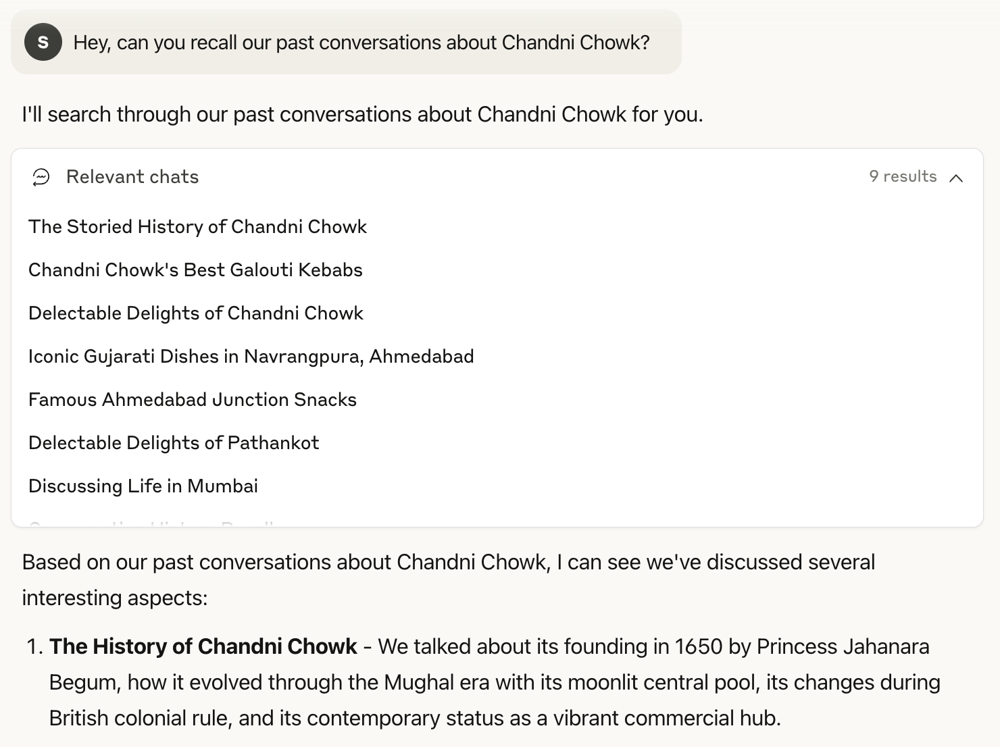
Here, the user asks Claude to recall past conversations about Chandni Chowk, and Claude retrieves 9 relevant chats (listed by title) and then synthesizes a summary from them. In a writing scenario, you could similarly search for “our previous chapter on X” and Claude would pull up the needed context. This on-demand recall ensures high fidelity to the original text when continuing a draft.
By contrast, ChatGPT’s memory would have likely pre-loaded something about Chandni Chowk if you had discussed it recently, but if not explicitly prompted, ChatGPT might not volunteer a summary; it works behind the scenes. One user noted that for writing fiction, Claude was “great at maintaining the thread of the story” and generating ideas in a long novel project – largely because with Claude he could load or retrieve all previous chapters as needed without hitting a context limit.
ChatGPT can certainly aid fiction as well, but you must be cautious about the 8K/32K token limit per session – very long stories might force ChatGPT to drop older chapters unless split into separate chats (where memory would then summarize them, but not hold exact prose).
Bottom line for writing: If you want a tool that automatically mirrors your style and remembers what you’ve written across sessions with minimal effort, ChatGPT’s memory is extremely useful. It will pick up your tone and even remind you of past ideas, acting like an editor who’s been with you through the whole project. Just keep an eye on factual consistency if the project evolves (update or correct any outdated info in its memory via instructions).
On the other hand, if maintaining precise continuity (especially for long-form content) is critical – for example in a novel or a detailed report – Claude gives you more control. You can reliably bring in exactly what you need from previous chapters or research notes. It requires a manual step, but you won’t wonder whether the AI “remembered correctly” – you decide what it sees. Many writers might even use both: draft with Claude when they need to ensure consistency over hundreds of pages, but use ChatGPT to polish language or generate ideas in line with their known style, given ChatGPT’s talent for personalization.
Memory in Coding Workflows
For developers and knowledge workers, an AI that can remember project specifics – like codebase details, naming conventions, or previous errors – is incredibly helpful. Let’s examine how ChatGPT and Claude support coding tasks with their memory capabilities, such as when working on a long-term software project.
Scenario: You’re developing a project with the help of AI. Last week you and the assistant wrote some helper functions and decided on a naming scheme and architecture. Today you want to continue coding a new module without rehashing all those details. You’d also like the AI to recall your preferred tech stack (libraries, frameworks) and even the server setup you mentioned earlier.
- With ChatGPT: ChatGPT’s memory is quite advantageous in a coding workflow, especially if you’ve consistently used it for the project. It builds up a profile of your project context as you chat. For instance, if in previous sessions you told ChatGPT “We’re using React with Material UI for the frontend and Django for the backend,” and perhaps you saved a memory like “Our project uses snake_case for variables,” ChatGPT will carry these details into new conversations. When you come back and say “Help me implement the user authentication in our project,” ChatGPT can infer details like “this is a Django project using that stack” from your memory. It might immediately start suggesting code using the same frameworks and naming style you’ve been using. Users have found that ChatGPT “remembers things that are important” in coding, often referencing other chats – e.g. you can ask “Do you recall how we handled input validation last week?” and if that was in your recent history, ChatGPT can answer based on that remembered context. This works because your user messages from those coding sessions (perhaps including some code snippets you provided) are part of the recent conversation log that ChatGPT references. However, note that ChatGPT’s memory of actual code has some limits: it only explicitly stores user-provided content, not the AI’s own past code outputs. So if you pasted a function in your message or described it, that can be remembered, but code that ChatGPT wrote in an earlier chat may not be directly in the memory (it might recall you asked for it, but not have the exact code unless you confirmed it or the conversation was continuous). In practice, ChatGPT will remember design decisions and function names you discussed. It might say, “We established a function
validate_user_inputlast time, so I’ll use that here” – reflecting a memory of your prior plan. Thanks to its memory summary, it could also know broader habits like you prefer iterative development or certain algorithmic approaches (e.g., if you often choose recursion, it might suggest that). The convenience is high: you can more or less dive in and ChatGPT will pick up the coding context with minimal prodding. - With Claude: Claude is very powerful for coding as well, but it leverages its large context and on-demand memory rather than a hidden profile. In a Claude session, you could literally dump large portions of your codebase or logs (tens of thousands of tokens worth) and it can work with all of that at once – something ChatGPT might struggle with unless you have GPT-4 32K. For multi-session continuity, suppose you had one Claude Project or chat where you built those helper functions last week. If you open a new chat to start fresh on the new module, you’ll want Claude to recall what it did before. You might begin with, “Recall our project’s code conventions and the helper functions we wrote.” Claude would then use
conversation_searchto find chats mentioning “helper functions” or specific function names, or perhaps you specify the project name to filter by project (Claude’s Projects feature groups chats, and memory search can target a project). Once retrieved, Claude can summarize the previous code and decisions: “We created functions A, B, and set up X. The naming convention was snake_case and we decided to use Django’s built-in auth for login…”. Now you have all the relevant context in this new session. You can proceed to ask for the new module implementation, and Claude will use that context faithfully. It might even incorporate exact code from those helpers by quoting them or by reference. Another approach many Claude users take is to keep one long-running chat for the project, thanks to the 100k context. This avoids multiple sessions altogether – you can have an entire project discussion in one Claude chat without running out of space (for comparison, GPT-4’s standard 8k token limit might force you to split into multiple chats over time, whereas Claude can go much further in one thread). If you do keep one thread, Claude’s memory tools are less needed – it already has everything in the conversation. It will remember the earlier part of the conversation naturally. For example, if 50,000 tokens ago in the chat you defined some classes, Claude can still reference them later in the conversation due to its extended context window. Developers have praised Claude for handling large codebases and maintaining coherence over very long sessions, often noting it’s “better for coding” in terms of following through complex tasks.
One difference to highlight: Claude’s attitude toward code memory vs ChatGPT’s. ChatGPT might sometimes infer what you want from memory – for instance, if you always create unit tests after each function, ChatGPT might proactively say “I’ll also write a unit test for this” because it remembers you usually ask for that. Claude, unless asked or previously instructed in the same session, won’t assume; it sticks to what’s explicitly provided or retrieved. This means Claude might be slightly less initiative-taking in coding continuity, but also less likely to accidentally bring irrelevant code or context. It “forgets” anything you didn’t remind it about, which can be good if your project contexts vary.
Example: Let’s say two weeks ago you worked on a data processing script with Claude and also last week on a web app with Claude, in the same account but different Projects. If today you ask Claude (without specifying project context) about something generic like “Implement a sorting algorithm,” it will not mix up details from your web app, because by default it’s not considering that at all (unless you accidentally search for it). ChatGPT, in a similar situation, might have both contexts in its single memory and could confuse or merge styles (though it usually uses conversation topic cues to avoid that). This is where Claude’s separate project memories help: your coding assistant for Project A is effectively siloed from Project B’s details.
In practical terms, ChatGPT’s memory is extremely useful for daily coding when you want a quick, personalized helper that knows your typical stack. It’s like a pair programmer who remembers your environment setup and naming whims (“We’re on AWS, using Postgres, and you like camelCase – got it”). On the flip side, Claude’s memory approach shines in complex coding projects where you need to navigate a lot of existing code or documentation.
The ability to retrieve and handle long files (Claude can take ~75,000 words of input) means you can ask it to, say, “Check our last 10 commit messages for references to the authentication module” and it can do that summary. ChatGPT would be limited to what’s in its brief memory summary or what you manually feed it chunk by chunk. Developers often leverage Claude for heavy-lifting like reading large logs or multiple files for refactoring, while using ChatGPT for smaller iterative coding tasks where its learned knowledge of their style speeds things up.
Memory tips for coding: With ChatGPT, it’s wise to save critical project info in the “saved memories” (via custom instructions or the new memory interface) – e.g. specify your language, frameworks, code style guidelines – so that it’s always included. Also consider using ChatGPT’s Projects feature to separate different coding projects, enabling project-only memory to avoid any bleed of details between unrelated codebases. With Claude, get comfortable invoking conversation_search with keywords like project names, file names, or error messages – it’s a quick way to pull up relevant context without scrolling. And remember you can edit the memory summary (if you’ve enabled Claude’s memory) to add notes like “Our coding style: snake_case, 2-space indent” so that Claude always has those top-of-mind.
Memory for Meetings & Research Notes
Another daily use case is summarizing meetings or keeping track of research information over time. Both AI assistants can help you turn raw meeting transcripts into summaries and remember key decisions or facts for later use. Here’s how their memory affects this workflow:
Scenario: You conduct weekly team meetings and feed the meeting notes to the AI to summarize. You want the assistant to recall what was discussed last week or a month ago when you’re in the next meeting. Similarly, imagine you use the AI for gathering research notes on a topic over several sessions – you’d like it to not repeat findings and to remember what you already covered.
- With ChatGPT: In the context of meetings, ChatGPT will automatically try to connect the dots between separate meeting summaries as long as your chat history is enabled. If, for example, you summarized “Team Meeting on Nov 1” in one session and “Team Meeting on Nov 8” in another, and then later ask “What decisions have we made so far regarding Project X?”, ChatGPT can draw on the Recent Conversation Content in memory which likely includes those summaries (especially if your initial user message in each chat said something like “Here are the notes for the Nov 1 meeting…” which would be stored). ChatGPT might not recall verbatim every detail (since the assistant’s full responses in those chats are not stored in memory), but it will recall your prompts and questions, which often encapsulate what you were discussing. For instance, if you asked “Summarize the budget discussion from today’s meeting,” that prompt is in memory with a timestamp and topic. So if you later ask a question referencing it, ChatGPT knows you had a meeting about “budget discussion” and could infer outcomes from how you framed it (and from any explicit follow-up user notes). Additionally, if you explicitly add something to saved memories like “Our project deadline is December 15 as decided in the Oct 25 meeting,” ChatGPT will definitely carry that forward. In practice, users find that ChatGPT often can reference other chats if you ask directly – e.g. “Remind me what we concluded in the last design review” – as long as those chats are recent and memory is on, ChatGPT will answer from memory (possibly paraphrasing what you wrote in that chat). It feels seamless: ChatGPT serves as a running log of meetings that you can query conversationally. However, one limitation is that if the meaty details of the meeting were only in the AI’s responses (like the summary it generated), ChatGPT’s memory might not include those specifics, because it only logs user inputs by design. So it might recall the meeting happened and general topic, but perhaps not the detailed summary content unless you provided it in the prompt. To mitigate this, some users paste the raw meeting transcript as a user message (which obviously can be huge – possibly exceeding ChatGPT’s input limits) or at least the key points as bullet points in the user message, so that those become part of the “user conversation history” that ChatGPT remembers. Another approach is to rely on ChatGPT’s User Knowledge memory: over repeated meetings, it will form an understanding like “Team X is tracking Project Y, which had issues A, B discussed, and upcoming deadline Z” – essentially it abstracts the continuity of the project. So when you ask a new question, ChatGPT may use that internal knowledge to contextualize its answer. For research notes, similarly, ChatGPT will keep track of what sources or facts you already explored (via your questions). If you had several chats researching different angles of a topic, ChatGPT’s memory might include those conversation topics so it doesn’t repeat the same sources, or it might recall your preferences like which sources you found credible. It won’t have the full text of sources read in prior chats, but it might say “Previously, we found data on X from [source], so building on that…”.
- With Claude: Claude can act almost like a dedicated knowledge base assistant for your meetings and research, thanks to its retrieval-based memory. Let’s say after each weekly meeting, you start a Claude chat, paste the transcript, and have Claude summarize it. Now, weeks later, you want to get a recap of all decisions on Project X from the past month of meetings. You can ask Claude: “What have we decided about Project X in the last 4 meetings?”. Claude will likely do a
conversation_searchacross your chats for “Project X” or for the dates of the last 4 meetings (perhaps you label each chat by date or topic). It might retrieve each of those meeting summary chats and then compile a combined summary for you, citing each meeting’s key points. This is something Claude can do exceptionally well – essentially performing a multi-document search and summary of your past interactions. You’ll see it list maybe 4 relevant conversations (e.g. “Meeting on Nov 1”, “Meeting on Nov 8”, etc.) and then give an answer like: “On Oct 18, the team decided A. On Oct 25, they changed approach to B. On Nov 1, they confirmed B and added detail C. On Nov 8, they finalized timeline for C.” gleaned directly from those chat logs. ChatGPT, in contrast, might not reliably enumerate each meeting’s decision unless you explicitly had provided all those details in its memory – it tends to answer more from the synthesized user profile (which might gloss over chronological order). Claude’s ability to target specific timeframes is also useful: you could say “Retrieve our chats from last November” using therecent_chatstool, and then ask it to summarize or search within those. This is very handy for quarterly reviews or tracking how a discussion evolved over time. In research scenarios, Claude’s memory approach means you can ask highly specific follow-ups even if the original info was weeks ago. For example, if you recall reading something with Claude’s help, you could prompt: “Claude, find the conversation where we talked about the market share statistics for 2020.” Claude will search your history for that content and surface the exact figure or paragraph, even if you last discussed it a while back – provided your query matches how it appeared in the text. Essentially, Claude can function as an AI-powered archive of your notes. One caveat: you do need to remember some reference (a keyword or approximate date) to trigger the right search. If you forget entirely, you might have to search a couple of times or be more general. But you’ll always get a verifiable answer drawn from what was actually said.
For meeting notes privacy, consider that ChatGPT’s automatic memory might mix different discussions. If you had a confidential meeting in one chat and a general one in another, ChatGPT’s global memory could theoretically let slip a detail if it thinks it’s relevant (though it tries to stay on topic). Claude, by keeping projects separate and retrieval explicit, ensures that only if you deliberately search across them would such bleed happen. Also, Claude’s new memory summary (for enterprise/pro) is geared toward “professional context,” and it explicitly avoids or lets you filter out sensitive info – you can tell Claude not to remember certain client names or such, and because you can view the summary, you can verify it. This can be reassuring for business users handling confidential meeting data.
Bottom line for meetings/research: If you value an AI that will continuously summarize and integrate your meeting knowledge with zero prompts – making it feel like a persistent team assistant – ChatGPT’s memory is very useful. It can remind you of what “you” discussed in broad strokes and bring context to new questions (e.g., knowing that “project Phoenix” is in crunch time without you having to restate it). However, if you need an accurate historical record or to pull up specifics on demand, Claude is incredibly handy.
Claude can act like your personal searchable archive, giving you confidence that no decision or detail is truly lost – you can always query it later. Many users might use ChatGPT to get quick contextual answers (“What’s the status of X?”) but use Claude when they need to compile a report of exact past data (“Give me all the Q&A from our last 3 client calls”). Together, they cover both convenience and meticulous record-keeping.
Memory in Project Tracking and Personal Preferences
Finally, consider the general scenario of tracking an ongoing project (goals, tasks, team info) and remembering personal preferences or profile info that affect daily interactions. This is a bit of a catch-all: it overlaps with the above use cases but is more about the assistant acting almost like a personal or team assistant over the long term.
Scenario: You interact with the AI frequently about various tasks – setting your goals for the week, noting your priorities, asking for status checklists, or even personal things like planning meals according to your diet. Over time, you expect the AI to know your overall objectives, your team roles (who is who), and your personal preferences (like “I don’t eat shellfish” or “I prefer metric units”). How do ChatGPT and Claude handle this kind of long-term memory?
With ChatGPT: This is where ChatGPT truly feels like a digital personal assistant. It builds and maintains a rich “knowledge graph” of you and your work (internally in text form). If you regularly use ChatGPT to, say, set daily to-do lists or discuss your quarterly OKRs (Objectives and Key Results), it will pick up on recurring themes and remind you of them. For example, if one of your goals is to improve at data analysis and you mention it a few times, ChatGPT’s memory will encode that. Weeks later, if you ask a question related to learning a new analysis tool, ChatGPT might recall “one of your goals is to improve your data analysis skills” and tailor the advice accordingly.
It might even proactively check in or tie answers back to that goal in subtle ways, thanks to its user knowledge memory. In terms of team information, if you told ChatGPT “Alice is the project manager and Bob is the QA lead” (and perhaps saved that as a memory), you can later ask “What feedback did Bob give last time?” and ChatGPT will know who Bob is and find the relevant context (assuming it was in your chat history). It’s adept at personal details: one user example – if ChatGPT knows you’re planning a trip to France (because you discussed it before), and you ask about vacation ideas, it might suggest French destinations unprompted. This kind of personalized touch is where ChatGPT’s memory stands out; it creates those “magical moments” of proactivity.
Likewise, for preferences: if you once mention “I’m a vegetarian” or “I prefer examples first, then theory,” ChatGPT will remember that and adapt responses to those preferences going forward (unless you start a completely new account or turn off memory). You also have full ability to input such info via Saved Memories in settings now – e.g. explicitly storing dietary preferences, units (imperial/metric), your job role, etc., so ChatGPT always considers them.
In daily use, this means less repetition: you don’t have to constantly remind it of your constraints or context – ChatGPT will say “As you’re vegetarian, here are some meal suggestions without meat,” or “Given your role as a product manager, here’s a project tracker template that might fit.” It essentially functions as a personalized assistant that learns about you with each use. However, ensure that you keep that info up to date (if something changes, update or delete the memory) to avoid it assuming an outdated preference (for instance, if you switch teams or diets and don’t tell ChatGPT, it won’t know).
With Claude: Out of the box, Claude would not retain personal details across chats – you would have to remind it each time or keep a persistent conversation. However, with Claude’s new memory feature rolling out, it’s now able to remember user and team preferences in a controlled way.
Claude’s memory summary for a project or for your team could include things like “Team roles: Alice (PM), Bob (QA)…” or “User prefers vegetarian diet and metric units” – if you have chatted about these and told Claude to focus on them. The difference is you get to see and edit that list. For example, in Claude’s settings you might find: “Claude remembers: Your team’s client X is high priority; you prefer concise communication; you dislike using jargon” – and you can correct or remove any item that’s wrong or not needed.
This gives assurance that Claude’s personalization won’t go beyond what you’re comfortable with. Now, practically speaking, if you ask Claude (with memory enabled) “Remind me what my top priorities are this week,” it could look at the running memory summary of recent tasks you emphasized and respond with those points – very much like ChatGPT would.
The advantage with Claude is if it ever gets something slightly off, you can directly tweak the memory summary (e.g. “No, that project is done, remove it from memory”), and Claude will update accordingly. Another advantage is project-scoped memory: if you have a personal project and a work project, Claude keeps them separate. So your personal preferences (say hobbies, or the fact you’re vegetarian) won’t appear in the work context unless you explicitly allowed it. This can prevent awkward or unprofessional bleed-over.
You can also have an Incognito chat with Claude for anything you truly don’t want remembered at all (maybe a private brainstorming or a health question) – that won’t be stored in memory or history. ChatGPT has a similar “turn off history” option, but Claude makes it a chat mode readily accessible with a click (ghost icon). In terms of project tracking, if you list out your tasks and goals in a Claude chat, you could later query “What were my main goals for Q1?” and Claude’s search would find the conversation (if memory summary didn’t catch it already) and tell you.
It’s very literal and reliable: it will give you exactly what you wrote as goals, not an interpretation. ChatGPT might give a slightly interpreted answer (“Your main goals were improving X and Y, as we discussed.”) whereas Claude might say “According to our planning chat on Jan 3, your Q1 goals were: 1) Improve X by 20%, 2) Launch Y feature, 3) Reduce support tickets by 15%.” – basically quoting your own notes.
Personal preferences are often better handled in ChatGPT historically, simply because ChatGPT has been doing it for longer (the Model Set Context feature introduced in 2024 specifically allowed storing things like “I’m allergic to shellfish” and that example is now classic). Claude was initially more of a blank slate each time. But as of late 2025, Claude’s catching up by allowing memory of such facts. Still, if you want an AI that clearly remembers your personal life details and brings them up proactively, ChatGPT is ahead.
Claude tends to orient memory toward professional/work contexts (their design philosophy was to maximize productivity while avoiding overly personal entanglement). In fact, Anthropic explicitly notes they focused Claude’s memory on “your team’s processes, project details, client needs, and priorities” – so it’s more about work info. It might not, for instance, spontaneously recall your birthday or favorite movie unless that’s crucial to your work context or you explicitly put it in memory. ChatGPT, on the other hand, might very well remember you love sci-fi movies if you talked about films a lot, and could bring that up in a casual recommendation chat.
When it comes to choosing for project tracking and personal assistance: If you want a very holistic AI assistant for both work and personal tasks, ChatGPT’s memory provides a unified profile that can handle both seamlessly – but you must trust it not to mix contexts inappropriately. It’s great for a single-user scenario where you do want everything integrated (after all, as Sam Altman noted, it makes the service “harder to leave” when all your history enriches every answer). If you have distinct domains (personal vs work) or higher privacy needs, Claude allows finer separation.
You can have Claude as a work aide who deeply knows work context and a separate project (or incognito) for personal stuff, without cross-contamination. And if you’re part of a team, Claude’s memory even works collaboratively (in shared projects, everyone sees the same memory summary for consistency). ChatGPT can be used in a team via Enterprise, but sharing its memory between users isn’t really a thing yet – it’s more individual.
In terms of daily routine, one might use ChatGPT each morning to generate a personal schedule or answer a random question (“What’s a good lunch given I like Thai food?” – it will recall you like Thai) – it’s very friendly for that. Then use Claude in the afternoon for a focused work session, confident that Claude remembers the project details and won’t suddenly bring up unrelated matters unless asked.
Prompt Behavior and Memory Limits
Before concluding, it’s worth summarizing how each assistant’s prompt behavior is influenced by memory and what happens when memory limits are reached:
ChatGPT’s prompt integration: Every time you send a message, ChatGPT constructs a system prompt that includes all those memory components (interaction metadata, recent chats, saved bits, summary). This means the actual prompt the model sees might be very large, especially if you have a lot of memory data.
(OpenAI has optimized this; for example, it doesn’t include full transcripts of 40 chats – just a one-liner and maybe your first messages, and assistant answers are omitted to save space.) The model then processes your query in that rich context. It “reads” all those memories every time and decides what’s relevant to use. If something in memory is relevant, it will incorporate or mention it; if not, it will ignore it. Notably, ChatGPT’s designers assume the model is smart enough to ignore irrelevant context even if a lot is provided. So far, this largely holds true, but it contributes to the model’s sometimes verbose style (it has a lot of context to consider).
Regarding memory limits: if your memory data plus your prompt exceed the model’s token window (say you have GPT-4 8K and memory took 2K tokens, you have ~6K for conversation), ChatGPT will truncate or compress things. It already truncates to last 40 chats and limits how much of each, etc. In a single long chat, if you exceed the window, older turns (outside the recent 8K/32K tokens) effectively drop out unless the system has a summarization mechanism (OpenAI hasn’t confirmed dynamic summarization within a single conversation, but it’s likely they do something to handle very long threads). In practice, you might notice ChatGPT forgetting or misremembering details from very early in a marathon chat – that’s a window limit issue, not the long-term memory system per se.
If the memory system itself doesn’t have enough info (e.g. you ask about something from 6 months ago and you’ve had more than 40 chats since, so it’s not in “recent conversations”), ChatGPT may genuinely not recall. It could respond with something like, “I’m sorry, I don’t have the details of that conversation. Could you remind me?” if it wasn’t captured in the user knowledge summary.
The User Knowledge summary updates periodically, but not in real-time. So there can be a lag – if you had a conversation yesterday about a new topic, it might not yet be distilled into your profile. In such cases, ChatGPT might come up blank about it in a new chat until a day or two later when the summary refreshes. It’s an evolving aspect.
Claude’s prompt integration: In default usage, Claude’s prompt at conversation start is minimal – basically just the base AI instructions and whatever you provide. Only when a memory tool is invoked does additional context get pulled in. So for the majority of Claude’s responses, the prompt remains clean and focused.
If you do use a memory tool, the retrieved text (or summary of it) is appended to the prompt for that turn. This means memory is only present when relevant – which helps Claude keep responses on track. It also means you have to structure your prompt to cue the memory retrieval (using those keywords or explicit asks). In the new memory-enabled mode, Claude will automatically insert a memory summary snippet at the start of the chat (similar to ChatGPT), but crucially you can see and edit this snippet. So you might see something like:
“Memory Summary: Project Phoenix: ongoing, deadline Dec 15, key stakeholders Alice (PM), Bob (QA). Preferences: formal tone, British English, no shellfish recipes.” This would appear in the system message or at least be visible. That becomes part of the prompt for every message, until you change it. Thus, with memory enabled, Claude’s prompt behavior becomes more like ChatGPT’s (always including some summary), but with the difference that it’s project-scoped and user-curated. Regarding limits, Claude’s massive 100k token window significantly raises the bar – you can include a lot of memory and conversation before hitting issues.
If memory summary + conversation did approach 100k, it might start to drop older messages or ask you to clarify (but most users won’t hit that in normal use – 100k is about the length of a novel). In tool-based retrieval, each retrieved chunk counts toward the token limit for that prompt. Claude’s default retrieval limits (5 results, etc.) are set likely to avoid overshooting the context size.
If you, say, tried to retrieve 10 very large past chats at once, Claude might summarize each or only take the most relevant parts to stay within bounds. If memory is not enough or not found (e.g., you ask for something not in any past chat), Claude will simply say it has no record of that or ask for details – it won’t hallucinate memory. This is nice: you’ll either get the info or a clear “I don’t recall that,” so you know where you stand.
In terms of transparency, ChatGPT might sometimes feel like it “magically knows” or occasionally “oddly forgets” – because you as the user don’t see the memory context it’s using. Claude is more explicit: if it didn’t retrieve something, you know it wasn’t included. If it did retrieve, you see the tool use and can even open those past chats yourself if you want. This transparency can help build trust, especially in work settings where why the AI gave a certain answer matters.
Conclusion: Which Memory Approach Suits Your Daily Work?
Both ChatGPT and Claude have powerful but differing memory features that can significantly boost productivity. There isn’t a one-size-fits-all winner – which is more “useful for daily work” truly depends on your use case and preferences. Let’s recap their strengths:
ChatGPT offers a hands-off, personalized experience. It’s like an assistant that organically learns about you and your tasks. This makes it fantastic for individuals who want an AI that remembers context across everything – you don’t have to repeat yourself, and it can surprise you by leveraging past info in helpful ways (e.g. reminding you of a past idea or tailoring an answer to your known taste). For everyday productivity – quick questions, continuous learning, brainstorming, personal tasks – ChatGPT’s memory creates a smooth, almost human-like continuity. It’s also very easy: no special commands needed; it remembers because that’s its default.
The potential downsides (context mixing or outdated info) can be managed by periodic memory upkeep (using the UI to remove old memories) and by using the Projects feature to silo different areas when needed. If you’re a knowledge worker or developer who juggles many topics but wants one AI assistant to track all of them, ChatGPT is extremely useful. Just be sure you trust how it handles your data and double-check critical recalls for accuracy.
It truly shines for scenarios where personalization and proactivity add value – for example, a business user who wants the AI to remember client preferences or a student who wants the AI to recall their past learning progress.
Claude provides a controlled, precision-focused experience. It behaves more like a smart archivist or tool that you query when needed, which aligns well if you prefer manual control and accuracy over convenience. For long-term projects, especially in professional settings (coding, research, project management), Claude’s approach ensures that nothing sneaky is affecting the model’s responses – it only knows what you choose to fetch.
This can increase trust in contexts like reviewing legal documents or summarizing confidential meetings, where you wouldn’t want the AI to draw in unrelated context by itself. Technical users often appreciate this explicitness – as Shlok Khemani noted, Anthropic’s user base “understand how LLMs work” and want memory as a deliberate tool, not an always-on background process.
With Claude’s new memory features, you can still get the convenience of persistence (it can remember your key info between sessions), but in a transparent way you oversee. Claude is arguably more useful when you have large volumes of information to work through – e.g., lots of documentation, logs, or a long novel – because its combination of large context and search tools can handle that effortlessly. Many developers and writers use Claude as their go-to for extended, in-depth sessions that would choke other models.
If your daily work involves a lot of information retrieval and you hate re-explaining context but also need strict boundaries (maybe you’re consulting for multiple clients and must keep their data separate), Claude is an excellent choice. It remembers when you want it to, and forgets when you don’t.
In fact, plenty of users leverage both assistants for their complementary strengths. For example, you might use ChatGPT to organize your day’s to-do list (knowing it remembers your broader goals and even personal quirks), and later use Claude to deep-dive into a specific project task where you have to analyze yesterday’s chat logs and continue from there.
One user on Reddit summed it up well: they preferred ChatGPT for ease of use and everyday common tasks, and used Claude for coding and writing that requires imaginative depth and maintaining long threads. This illustrates that “more useful” can depend on the context: ChatGPT was their pick for general usage, Claude for specialized creative and technical work.
To decide which memory approach fits your daily work, consider these questions:
- Do you want the AI to take initiative in remembering things about you and personalizing outputs (even across different topics)? If yes, ChatGPT’s memory will feel like a helpful magic. If not (you prefer to explicitly decide what it should recall each time), Claude might suit you better.
- Are you dealing with multiple distinct projects or sensitive information where leakage is a concern? Claude’s strict separation (or ChatGPT’s project-only mode, if you configure it) will be important. ChatGPT by default might blur lines unless managed, whereas Claude keeps contexts compartmentalized by design.
- Is your work such that you often need to reference exact previous content (like specific past meeting points, code blocks, document text)? Claude’s retrieval will reliably give you the verbatim content, while ChatGPT might give a higher-level recall or might not have stored the exact text.
- Do you value transparency and editability in what the AI remembers? Claude lets you peek into its memory file, edit it, or wipe it clean easily. ChatGPT’s memory is partially user-controlled (you can edit “saved memories”) but the AI-generated profile is hidden and not directly editable. You have to rely on workarounds to correct it (like explicitly telling the AI new info to override old). Some power users enjoy diving under the hood – those folks might prefer Claude’s philosophy.
In conclusion, both Claude and ChatGPT can significantly enhance daily productivity when used to their strengths. ChatGPT acts like an ever-present personal aide that learns and adapts to you, which is fantastic for a broad range of everyday tasks and for users who want a “zero setup” experience. Claude acts more like a faithful research assistant or project partner that will recall information only on command, which is ideal for maintaining accuracy and boundaries in complex professional workflows. Neither is universally “better” – they are different.
The good news is you don’t have to pick just one. Many productivity and knowledge workers keep both in their toolkit. For instance, use ChatGPT to quickly draft an email in your preferred style (it remembers you like a polite, formal tone with short paragraphs), then switch to Claude to analyze an attached log file that’s 1MB of text (Claude’s memory can handle it in one go). Or vice versa: maybe use Claude to generate a detailed technical outline (knowing it won’t hallucinate any steps because it can reference exact documentation), then pass it to ChatGPT to flesh out in a more personable tone that fits what it knows about your audience.
Ultimately, when it comes to daily work, the most useful memory is the one that augments your workflow best. If you need an AI that “just remembers everything” and seamlessly integrates context, ChatGPT is likely your go-to. If you need an AI that “remembers exactly what you ask it to and nothing more” with precision and editability, Claude will be incredibly useful.
As AI assistants continue to evolve, we may even see hybrid approaches that try to offer the best of both. For now, understanding these differences helps you leverage each tool more effectively – using memory to boost your productivity, while avoiding pitfalls. Both Claude and ChatGPT can be game-changers for writing, coding, research, and project management – and with the right approach, you can make them remember what matters, and forget the rest, to keep you moving forward efficiently.