


Scriptwriting can feel daunting for new writers, but Claude AI (by Anthropic) offers a powerful co-writer to guide you from idea to finished script. This article will show, step-by-step, how to leverage Claude’s chat interface for different script formats – feature films, TV episodes, and even YouTube videos – using ready-made templates and prompts.
We’ll cover everything from structuring your story (three acts, sequences, beats) to formatting scenes and dialogue, all in a beginner-friendly way. By the end, you’ll have a clear workflow to brainstorm, outline, and write scripts with Claude as your creative partner.
Why Use Claude AI for Scriptwriting?
Claude is an AI assistant known for its large context window and strong language skills. In practical terms, Claude can ingest and produce very large amounts of text – up to 100,000 tokens (around 75,000 words) at a time.
This means you can feed Claude an entire outline or even a script-in-progress and get coherent, context-aware suggestions. The chat-based interface makes it feel like a collaborative brainstorming session rather than using a rigid software tool.
Key advantages of Claude for scriptwriters include:
- Brainstorming & Ideation: You can ask Claude to pitch story ideas, create plot twists, or develop scenarios on the fly. It’s like having a writers’ room buddy available 24/7.
- Large-Scale Outlines: Claude can remember long structures and details, so it’s great for generating or refining extensive outlines (even spanning a whole film or season) without losing track.
- Dialogue and Prose Generation: Claude excels at producing natural-sounding dialogue and vivid descriptions when prompted properly. It can help flesh out scenes and character interactions with surprising creativity.
- No Specialized Software Needed: You don’t need Final Draft or other formatting software just to get started. Claude can output in plain text screenplay format (scene headings, action lines, character dialogue, etc.) which you can later polish or import into a script editor. It’s accessible to anyone with an internet connection.
- Beginner-Friendly Guidance: For newcomers, Claude can also act as a tutor – for example, explaining the logic of a three-act structure or suggesting improvements to a scene. It can analyze your script’s pacing or find plot holes if you prompt it to do so.
In short, Claude can be your AI co-writer: handling tedious bits (like reformatting dialogue or summarizing scenes) and stimulating your creativity with ideas, while you remain the director of your story. The next sections break down how to use Claude on specific project types, with ready-to-use templates for each.
Using Claude for Feature Film Scriptwriting
Feature film scripts (generally 90–120 pages for a full-length movie) require solid story structure and engaging scenes. Claude can help at each step of the process, from outlining your plot in acts to drafting individual scenes. The examples below focus on film writing, but the principles apply to any long-form script.
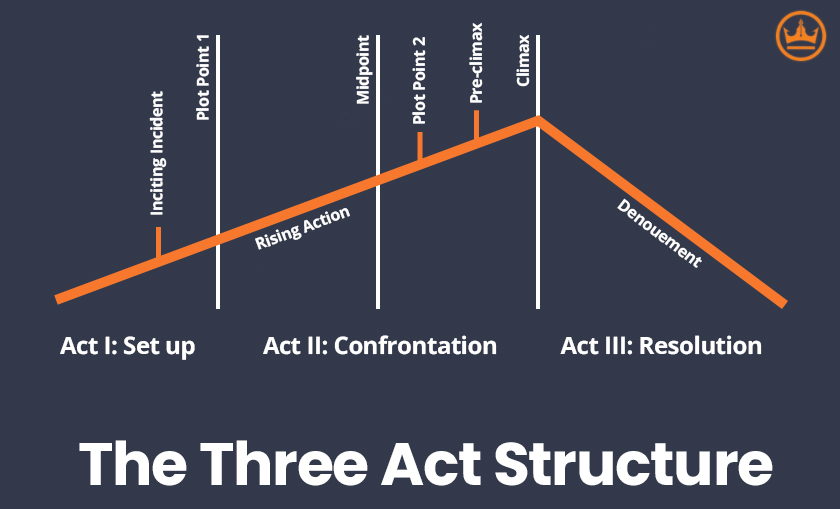
The classic Three-Act Structure divides a film story into Setup, Confrontation, and Resolution, with key turning points (inciting incident, midpoint, climax, etc.) guiding the protagonist’s journey.
Step 1: Outline the Story Structure. Most films follow the Three-Act Structure, a time-proven framework dividing the story into a beginning, middle, and end. In Act I, you set up characters and conflict; Act II deepens the confrontation and stakes; Act III brings the climax and resolution. This structure helps ensure your story has a clear setup, escalating tension, and payoff. You can have Claude generate a high-level outline by specifying the major beats you want (inciting incident, turning points, finale, etc.).
Another approach is the Eight-Sequence Structure, which breaks the script into 8 segments (~12-15 minutes each) – a method originating from the old reel-change days of cinema. Each sequence has its own mini-climax to keep the audience hooked, preventing the “sagging middle” that often plagues scripts. Claude can help you map out these sequences to ensure something exciting happens every 10–15 pages.
Below are template prompts you can copy into Claude to create film outlines using these structures:
Template: Feature Film Three-Act Structure Outline
Use this prompt to have Claude draft a full three-act outline for your movie idea. It will break the story into Act I, II, III with the major plot beats:
You are a screenwriting assistant. Outline a feature film story in a classic **Three-Act Structure** format.

**Act I (Setup):** Describe the opening setting, introduce the protagonist [and key characters], and include an Inciting Incident that sparks the main conflict.

**Act II (Confrontation):** Outline the rising action: the protagonist faces obstacles, developments, and a Midpoint twist. Include how stakes escalate and mention a low point or crisis towards the end of Act II.

**Act III (Resolution):** Outline the climax – the final confrontation or challenge – and how the story resolves. Ensure all major threads are concluded in a satisfying way.

The film genre is **[your genre]** and the logline/premise is: **[a one-sentence summary of your story idea]**.

Provide the outline as bullet points or paragraphs under each Act, highlighting the key plot points.
What this does: This prompt explicitly instructs Claude on the purpose (to act as an “assistant” using screenwriting knowledge) and the structure (Act I, II, III with what each contains). It asks for specific elements like the inciting incident, midpoint, and resolution. Be sure to replace the [bracketed] sections with your genre and story idea. Claude will then generate an outline touching all the major beats. You can further prod it to add more detail or adjust events as needed.
Template: 8-Sequence Story Structure Outline
If you prefer the eight-sequence approach to ensure constant momentum, try this prompt. It will have Claude break your film into eight sequences (which roughly align with the acts):
Outline a **Feature Film** using the 8-sequence structure (eight segments of the story). Each sequence should be a paragraph with:

- **Sequence 1 (Setup & Inciting Incident):** [Describe the protagonist’s ordinary world and the inciting incident that kicks off the conflict].

- **Sequence 2 (Predicament & Lock-In):** [Describe how the protagonist faces a predicament and gets committed to the journey by the end of sequence 2].

- **Sequence 3:** [Challenges and rising action as Act II begins].

- **Sequence 4:** [First major turning point or midpoint of the film].

- **Sequence 5:** [Protagonist deals with consequences; stakes increase].

- **Sequence 6:** [Second major turning point, perhaps the “All is Lost” moment toward end of Act II].

- **Sequence 7 (Climax Preparation):** [Protagonist regroups for the final confrontation].

- **Sequence 8 (Climax & Resolution):** [Describe the climax and how the story resolves].

The film premise: **[your premise]**. Each sequence ends on a dramatic beat or twist to keep the audience engaged:contentReference[oaicite:8]{index=8}.
How to use: Fill in your premise and let Claude expand each sequence. This template ensures every ~12-15 pages of your script has a purpose (e.g. Sequence 2 ends with a “lock-in” where the hero can’t turn back, Sequence 6 might be the low point, etc.). Hollywood scripts often follow this pattern to maintain pacing, and Claude can help flesh out what could happen in each segment.
Template: Beat Sheet Outline (Key Story Beats)
Another useful planning tool is a beat sheet, which is essentially a list of the major story beats or moments in your screenplay. This focuses on emotional and narrative turning points rather than detailed scenes. A popular example is the Blake Snyder “Save the Cat” beat sheet with 15 beats, but you can also use a simpler set of beats.
Use this prompt to have Claude create a beat sheet:
Create a **beat sheet** for the following movie idea: **[your logline or brief premise]**.

Include the major story beats and a one-sentence description of what happens in each. For example, cover beats such as:
- **Opening Image:** How the story begins (the tone or snapshot of the protagonist’s world).
- **Setup:** Introduce main character and their status quo.
- **Inciting Incident:** The event that changes everything:contentReference[oaicite:13]{index=13}.
- **Debate:** The hero’s hesitation or conflict about what to do next.
- **Break into Act II:** Hero commits to the journey.
- **Midpoint:** A significant middle turning point (e.g. big victory or defeat) that raises the stakes.
- **All Is Lost (Low Point):** The moment it seems like failure is imminent.
- **Climax:** The final confrontation or challenge.
- **Finale/Resolution:** How the story and character arcs conclude, and the final image to end on.

List each beat in order with its description. Keep them concise (1-3 sentences each).
Why this helps: A beat sheet is a skeletal outline of the story’s major moments – decisions, revelations, twists – that give the script its forward momentum. By prompting Claude with structured beat names (Opening Image, Inciting Incident, etc.), you’ll get a clear roadmap of your story’s important events. You can include or remove beat labels as you prefer (for instance, you might use Snyder’s 15 beats, or a shorter list as in the prompt above).
Once Claude provides the beat sheet, you as the writer can verify the story flow feels satisfying and tweak any beats that need strengthening. This beat list can then guide you (and Claude) when writing the actual scenes.
Step 2: Develop Scenes and Dialogue. With a solid outline in hand (from one of the templates above), you can move to the scene level. Claude can help by expanding outline points into actual scenes with sluglines, action, and dialogue. You’ll want to guide Claude to use proper screenplay format at this stage – including scene headings (also called sluglines) to mark each scene’s location and time, and correctly formatted character names and dialogue.
We’ll cover formatting in detail later, but essentially you’ll prompt Claude with something like: “Write Scene 1: INT. APARTMENT – NIGHT. [Briefly describe what the scene should accomplish]. Show [Character A] and [Character B] having an argument that introduces the central conflict.” Claude will then produce a draft scene. You can iterate on it by instructing changes (e.g. “make the dialogue more tense” or “shorten the descriptions”).
If you prefer, you can generate multiple scene drafts in one go by listing the scenes: “Write short drafts of the following scenes: 1) [scene description] 2) [next scene] 3) [next]…”, but be cautious – a very large ask might test Claude’s coherence. It’s often effective to go scene by scene, so you can review each before moving on.
Step 3: Refine and Polish. Once you have scenes drafted, Claude can also assist in reviewing and revising. You could ask it to act as a script editor: “Analyze the above scene for any dialogue that feels unnatural or any unnecessary exposition, and suggest improvements.” Because Claude can consider the script as a whole (thanks to the large context window), it might catch that a character’s behavior is inconsistent with an earlier scene, or that a certain plot point wasn’t set up.
Use these AI suggestions critically – you make the final call on changes. Claude can even help with specific tasks like trimming a scene’s description to make it snappier, or punching up dialogue with more distinctive voice. Treat it like an assistant who gives you options, which you then refine into the final screenplay.
In summary, for film scripts Claude can be used to brainstorm ideas, outline the plot structure, flesh out each sequence/act, and draft scene-by-scene content. Next, we’ll look at how to adapt these techniques to episodic series writing, where additional factors like pilot episodes and season arcs come into play.
Using Claude for TV Series Scriptwriting
Writing for TV or web series introduces new challenges: you’re dealing with episodic structure, recurring characters evolving over multiple episodes, and the need to hook viewers not just once but at the end of every episode. Claude can assist in planning both individual episodes (like a pilot) and season-long arcs. It’s like having a virtual writers’ room collaborator to help you map out how a series unfolds over time.
When using Claude for TV scripts, keep in mind:
- Episode Structure: TV episodes often have acts as well (with act breaks for commercials in network TV). A one-hour drama might be broken into 4-5 acts, whereas a half-hour sitcom might have 3 acts. Many streaming shows still follow a similar structure internally. You can prompt Claude to outline an episode by acts or by major plot beats.
- The Pilot Episode: The pilot has to introduce the world and characters and tell a compelling story that leaves the audience wanting more. Claude can help balance those tasks by generating a pilot outline that seeds future conflicts while delivering a self-contained story for episode 1.
- Cold Opens & Cliffhangers: TV often uses cold opens (a teaser scene before the opening credits) and cliffhanger endings to maintain suspense. You can ask Claude to craft a cold open that grabs attention, or to suggest a cliffhanger final moment for an episode that will lead into the next.
- Season Arc Planning: In addition to episode-by-episode plotting, it’s crucial to have a sense of the overarching season arc (and possibly series arc). Claude can help you brainstorm how characters and conflicts develop across 8–10 episodes, ensuring the story has continuity and escalation toward a season finale.
Let’s dive into some templates and prompts for series writing.
Template: TV Pilot Episode Structure
Use this template to outline a pilot episode for your series. It focuses on setting up the show’s premise and ending with a hook:
You are a TV writer’s assistant. Outline the **Pilot Episode (Episode 1)** of a series titled **"[Your Series Title]"**.

- **Premise/Genre:** [Brief description of the show’s premise, genre, and setting].

Structure the pilot into **Acts**:
**Act 1:** Establish the world and characters. Introduce the protagonist and their normal life. Include an Inciting Incident that presents the main conflict or mystery of the series:contentReference[oaicite:15]{index=15}. End Act 1 on a moment that pushes the hero to take action.

**Act 2:** The protagonist begins to confront the new situation or problem. Include character interactions that highlight the central relationships/dynamics. Perhaps introduce a subplot or a villain. Build tension and end Act 2 with a twist or complication.

**Act 3:** (if hour-long, continue with Act 3, 4, etc. If half-hour, Act 3 might be final.) Escalate conflicts and move toward a climax of the episode. In the final act, have a climax/resolution of the episode’s immediate plot *but also* plant a **cliffhanger or open question** for the season:contentReference[oaicite:16]{index=16}. The last scene or final beat should reveal something or pose a new dilemma that makes the viewer eager for Episode 2.

Conclude the outline by noting the **hook/cliffhanger**: e.g., a shocking revelation or a character decision that will drive the next episode.
Using the prompt: Fill in your series premise (e.g. “a medical drama about an idealistic young doctor in a chaotic ER” or “a mystery thriller about missing kids in a small town with a supernatural twist”). Mention the tone/genre because that influences the style of the pilot. The prompt guides Claude through a typical pilot structure: it explicitly asks for acts and what each should contain. If your show is intended for streaming without commercial breaks, you might structure it simply as beginning, middle, end (or omit act labels), but it’s still helpful to think in terms of plot beats.
Claude will generate an outline that covers introducing the main characters and the world, the inciting incident (which in a pilot is often the series premise trigger), and a hint at the bigger arc to follow. Ensure that the final moment raises a compelling question or challenge – Claude should include that as a cliffhanger (you can nudge it: “end on a cliffhanger with [XYZ]”). For example, many great pilots end with a reveal or twist that points to the season’s central conflict.
Cold Open Option: If you want a cold open, you can prepend something like: “Start with a Cold Open scene: a short teaser before the credits that grabs attention (for instance, a flashforward or a dramatic mini-scene). Then continue with Act 1.” Claude can draft a cold open that’s separated from Act 1 – just remember to mark it clearly in the prompt.
Template: Season Arc Outline
For longer-term planning, have Claude help outline the entire season of your series. This template will list episodes with their key events:
Outline a **10-episode Season 1** for **"[Series Title]"**:

For each episode (Ep1 to Ep10), give a one-paragraph summary including:
- The episode’s main conflict or story focus.
- How the characters develop (especially the protagonist) in that episode.
- Any major twists or reveals.
- How the episode ends (especially note cliffhangers or unanswered questions leading to next ep).

Also ensure the outline shows the **season arc** – how the overarching conflict builds and progresses each episode. For example, Episode 1 introduces [major conflict]; mid-season (Ep5 or Ep6) should have a turning point; Episode 10 is the finale that resolves the big arc.

Episode 1 (Pilot): ...
Episode 2: ...
...
Episode 10: ...
What to expect: Claude will enumerate Episode 1 through 10 (or however many you specify) and provide a synopsis for each. This is essentially a series bible overview of the season. It should reflect rising stakes and evolving character arcs over time. For instance, you might see it output something like: “Episode 1: Introduces X and Y, ends with discovery of Z.
Episode 2: Characters deal with fallout of Z, new character introduced…” and so on, with Episode 10 culminating in the climax of the main storyline. Feel free to adjust the level of detail – you can ask for just 2-3 sentences per episode for a broad sketch, or more detail if needed. This outline ensures you (and Claude) keep the big picture in mind, so episodes remain cohesive in service of the overall narrative. You can always come back and expand any episode outline into a full scene-by-scene breakdown with Claude’s help later.
Tip: Mention any particular structure or engine your show has. For example, if it’s a procedural (like a case-of-the-week cop show), each episode will have its own case along with the season arc in the background. If it’s a heavily serialized drama, each episode directly continues the last. Claude will adapt if you clarify this in the prompt. You can also specify if certain episodes should be special (e.g. Episode 7 has a big twist, Episode 9 is a penultimate cliffhanger, etc.).
Using Claude for series writing can significantly speed up the process of plotting and ensure consistency. It’s great for generating lots of ideas (like multiple potential subplots or complications) – you can ask something like, “List some possible twists that could happen mid-season in this story,” and then incorporate the ones you like into the outline. Always remember to maintain creative control: the AI can suggest and draft, but you decide what fits your vision and what to modify.
Using Claude for YouTube & Web Video Scriptwriting
Not all scripts are for big dramas – many creators want help crafting short-form scripted content, like YouTube videos, web shorts, or educational videos. These scripts (often 3 to 12 minutes long) have their own structure and needs. Claude can assist here as well, helping you produce a tight script that hooks viewers and delivers your content clearly.
When writing YouTube or web video scripts with Claude, consider the common structure these videos follow:
- Hook/Intro (first 5-15 seconds): Online viewers have short attention spans. A strong hook – a surprising fact, a bold question, an exciting preview of what’s to come – is crucial. Claude can help craft a punchy introduction that grabs attention immediately.
- Introduction of Topic: After the hook, the script usually introduces who you are (if personal branding matters) and what the video is about, in a concise way.
- Main Content in Sections: The body of the video might be broken into a few key points or steps (for a tutorial, listicle, or essay-style video). It needs logical flow and clarity. Claude can help outline these sections and even generate engaging explanations or examples for each.
- Visual Cues: Though Claude is text-based, you can include notes in the script for visuals or emphasis (e.g. “[SHOW GRAPHIC OF XYZ]”). It won’t generate images, but it reminds you to include them later.
- Call to Action/Conclusion: Many videos end with a summary, a call to action (like asking viewers to subscribe, or a final thought to encourage comments), or a teaser for the next video. Claude can draft a friendly sign-off or CTA if you prompt it.
Another important aspect is tone – YouTube scripts are often conversational. You can instruct Claude to maintain a casual, engaging tone (for example: “Write in a friendly, first-person tone as if speaking to the camera, with a touch of humor.”). Also, if SEO or keywords matter (for instance, you want certain phrases included for search ranking), you can tell Claude to weave those in – though for a natural feel, avoid keyword stuffing.
Here’s a template for a general-purpose YouTube video script:
Template: YouTube Video Script Format
**Title/Topic:** [Your video topic]

**Goal/Audience:** [Optional: what you want the video to achieve and who it's for, e.g. "explain Python programming basics to beginners" or "entertain viewers with a travel story"].

Now write a script for a [approximate length, e.g. 5-minute] YouTube video. The script should include:

1. **Hook/Opening (0:00 - 0:15):** Start with a compelling hook to grab attention – a question, bold statement, or interesting teaser about [the topic]:contentReference[oaicite:19]{index=19}.

2. **Intro (0:15 - 0:45):** Briefly introduce myself as [if you have a persona or channel name] and introduce the topic more fully. Give viewers a reason to watch till the end (e.g. mention what they will learn or gain).

3. **Main Content (0:45 - 4:30):** Deliver the core content in a few clear sections:
   - **Point 1:** [First main point or story beat about the topic].
   - **Point 2:** [Second main point, etc. Include examples or anecdotes to illustrate].
   - **Point 3:** [Third point, and so on…].
   Use an engaging, conversational tone, as if talking to the viewer. Keep sentences short and approachable. Feel free to add a bit of humor or rhetorical questions to keep it lively.

4. **Conclusion (4:30 - 5:00):** Summarize the key takeaway. End with a call-to-action, e.g. *“If you enjoyed this or found it useful, hit the like button and subscribe for more. Let me know in the comments [some prompt for engagement].”*:contentReference[oaicite:20]{index=20}. Finish with a friendly sign-off.

Script it as if it will be read aloud, with clear and engaging language. Include [any specific phrases or keywords] relevant to the topic, but keep it natural.
How this works: This prompt is quite specific, guiding Claude through each section of a typical YouTube script. The time stamps (in minutes:seconds) are just indicative, helping Claude understand the proportion of the script (you can adjust times based on desired video length).
The bullet points and instructions in each section (like “conversational tone”, “maybe add humor”) help ensure the style matches what works for online content. Claude can produce a script that, when read aloud, fits roughly the time you indicate – you might need to trim or expand a bit afterward, but it usually comes close.
Feel free to modify according to your content type. For example, if you’re doing a tutorial, your main content might be step-by-step instructions. If it’s a storytime vlog, your structure might be more narrative (setup, story climax, resolution). Adjust the template to those needs (Claude will follow your lead). You can also ask Claude to suggest video title ideas or thumbnail text separately if you want – it’s quite good at those creative snippets too!
In using Claude for YouTube scripts, you’ll likely iterate: first get a draft, then say “shorten this part” or “make the tone more enthusiastic” or “insert a statistic about X in the hook”. Claude’s quick turn-around for edits can drastically reduce writing time while keeping your voice. Always do a final read-through to ensure it sounds like you (and fact-check any factual statements it made – AI can sometimes get facts wrong or outdated). But overall, Claude can help you generate a polished script for video content rapidly, letting you focus on performance and production.
Developing Characters and Arcs with Claude
Whether you’re writing a film or series, compelling characters are at the heart of any script. Claude isn’t just useful for plotting; it can also help you flesh out characters’ personalities, backstories, and arcs. Many writers use AI as a brainstorming tool to explore a character’s motivations or to generate character bios. Here’s how you can leverage Claude in this area:
- Character Profiles: You can prompt Claude to create detailed character sheets – including physical description, background, personality traits, goals, flaws, and even how the character’s arc might progress. For example: “Create a character profile for my protagonist: a 30-year-old high school teacher who secretly wants to be a musician. Include her backstory, strengths, flaws, and how these might affect her journey.” Claude will produce a rich profile that you can cherry-pick ideas from.
- Relationships and Dialogue Style: Ask Claude how two characters might interact given their traits. For instance: “Describe the dynamic between [Character A] and [Character B], and how their relationship evolves through the story.” This can inspire subplots or conflict. Claude can even generate sample dialogue exchanges to illustrate their chemistry or conflict (useful if you’re finding a character’s voice).
- Character Arcs: A character arc is the transformation or inner journey of a character over the story. Claude can help outline classic arc patterns like the Hero’s Journey or less common ones like a Flat Arc or Negative Arc. We’ll explore those with specific templates below.
Three common types of protagonist arcs are positive change arcs, flat arcs, and negative (fall) arcs. In a positive arc, the character grows in a beneficial way (overcomes a flaw or misconception – most hero stories).
A flat arc means the character doesn’t fundamentally change their values – instead they might change the world or people around them while staying true to themselves (common for iconic heroes or episodic series protagonists). A negative arc is a tragic decline – the character changes for the worse (think of stories where a hero turns villain or is consumed by their flaw). Claude is familiar with these concepts and can help you map them.
Below are templates to prompt Claude for each of these arc types:
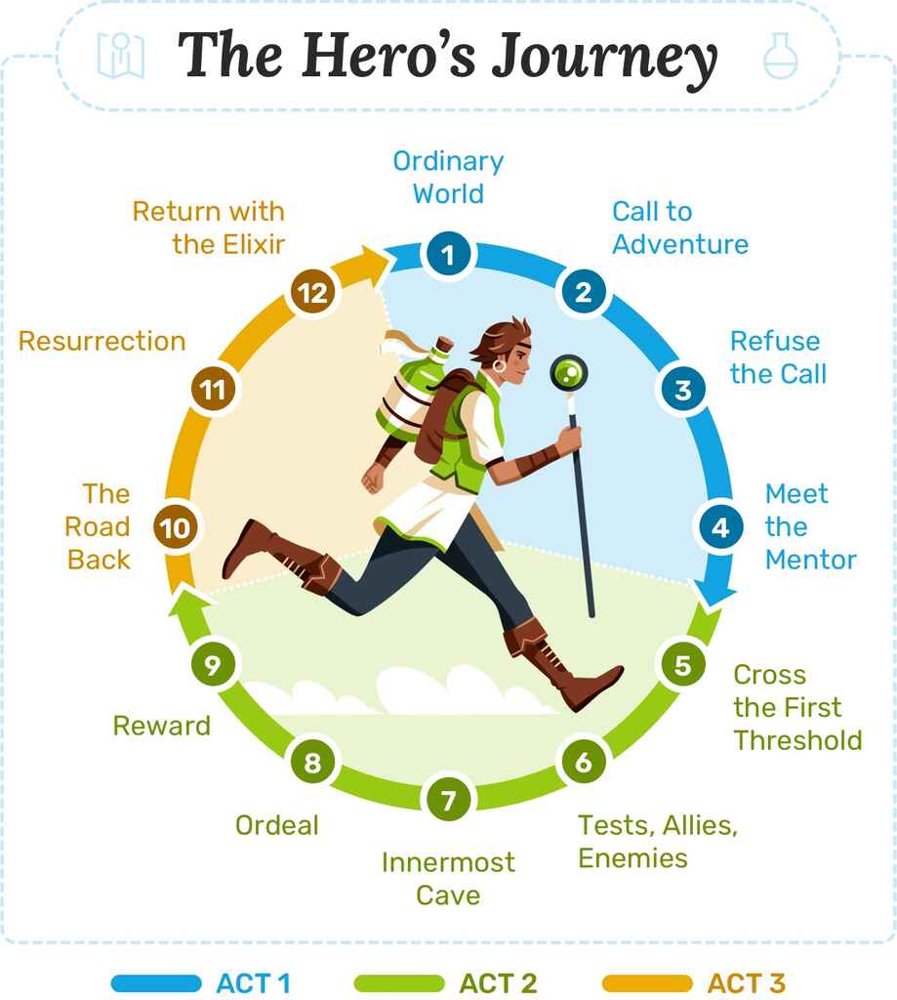
The Hero’s Journey is a classic positive arc structure in 12 stages, where the hero ventures out, faces trials, undergoes transformation, and returns with newfound wisdom.
Template: Hero’s Journey Character Arc
If you want to develop a classic hero’s journey arc for your protagonist (a specific type of positive arc with mythic structure), use:
"The Hero’s Journey" – Develop a character arc for **[Protagonist Name]** following the hero’s journey stages.

Character: [brief description of who they are at the start, and what challenge they face].

Outline the journey in steps, including:
1. **Ordinary World:** [Who the hero is initially and their situation]:contentReference[oaicite:29]{index=29}.
2. **Call to Adventure:** [The challenge or call that beckons them].
3. **Refusal of the Call:** [Do they hesitate? What fears or doubts?].
4. **Meeting the Mentor:** [Who or what helps them commit to the adventure].
5. **Crossing the Threshold:** [Hero leaves their comfort zone].
6. **Tests, Allies, Enemies:** [Early obstacles, making friends, encountering foes].
7. **Approach to the Inmost Cave:** [Hero approaches a major challenge – the heart of the journey].
8. **Ordeal:** [The biggest test/crisis where they face potential failure or death].
9. **Reward:** [Hero wins or gains something (literal or metaphorical) after overcoming ordeal].
10. **The Road Back:** [Hero begins return, but faces consequences or a chase].
11. **Resurrection:** [Climax – hero faces final test, one last showdown that transforms them]:contentReference[oaicite:30]{index=30}.
12. **Return with Elixir:** [Hero returns to their ordinary world, changed, with some “elixir” (knowledge, power, resolution) to benefit others].

For each step, describe how [Protagonist] experiences it in the context of **[your story setting]**. Highlight how the character grows or changes through each stage.
What this does: This prompt explicitly walks Claude through the 12 classic stages of the hero’s journey. Replace the placeholder details with your character and story specifics (e.g., “Character: Luke Skywalker, a farm boy who dreams of adventure, faces a galaxy-wide conflict against an evil Empire.”). Claude will generate a sequence of paragraphs or bullet points describing each stage as it relates to your character.
This effectively maps out both external events and the internal growth (from timid farm boy to confident Jedi, in the Star Wars example). The hero’s journey is great for conceptualizing positive change arcs because it ensures the character undergoes significant transformation and returns wiser.
Even if your story doesn’t literally have magical mentors or elixirs, Claude will adapt the metaphor to your context. Use this as a framework – you don’t have to hit every step perfectly, but it will give you a rounded view of the character’s possible journey.
Template: Flat Character Arc
For a flat arc, the character’s core beliefs or personality remain steady; instead, the world around them changes or comes to recognize the truth the character already knew. These arcs are common for protagonists in long-running series (who need to remain fundamentally the same over episodes), or for iconic heroes in adventure franchises (who influence others without themselves changing too much). Here’s how to prompt Claude:
Develop a **Flat Character Arc** for **[Protagonist Name]** over the story.

[Protagonist] starts the story with a strong core belief: **"[Statement of their belief or truth]"**. This belief is actually *true* (and positive), but the world around them or other characters do not accept it initially.

Outline how:
- [Protagonist] is tested throughout the story by challenges that pressure them to abandon their core belief. (Give examples of situations where sticking to their principles is hard.)
- [Protagonist] remains steadfast and does **not undergo a fundamental change** in their values:contentReference[oaicite:33]{index=33}. However, through their actions, they gradually change others or solve the external conflict.
- Key moments where [Protagonist]’s conviction influences supporting characters or proves others wrong.
- By the end, the world/others have changed **because of [Protagonist]’s steadfastness** – e.g., other characters learn to appreciate the hero’s perspective, or a community is saved by adhering to the hero’s ideals.
- Any **internal doubts** the character faces (even flat arc characters can momentarily doubt themselves) and how they overcome them without fundamentally changing who they are.

Conclude how [Protagonist] ends the story the **same person** morally/ideologically as they began, but the **world around them is better** for it (or, in a negative flat arc, the world fails to change and tragedy ensues).
Explanation: We explicitly instruct that the character will not fundamentally change, which tells Claude to focus on external change. For example, think of Sherlock Holmes in many stories: he doesn’t transform internally (he’s brilliant and confident from start to end), but he solves the case and maybe others learn to trust his methods. Or in a character-driven example, Forrest Gump has a flat arc – Forrest himself stays the same kind, simple man, but he changes the lives of people around him.
Claude will outline situations that test the protagonist’s belief, moments where they stand firm, and how that impacts others. The prompt even allows for a note on a negative flat arc variant (though more rare) – e.g. a character who remains unchanged in a flawed worldview and the world doesn’t improve, but generally a flat arc is used for positive or heroic roles. Use the output to ensure your “steadfast” protagonist still has an emotional journey (flat arc doesn’t mean boring – they can face big obstacles, they just don’t have a traditional change-of-heart).
Template: Negative Character Arc (Fall Arc)
For a tragedy or anti-hero tale, a negative arc can be compelling. This is where the character starts off perhaps good or neutral and undergoes a moral decline or personal downfall. To have Claude sketch this:
Outline a **Negative Character Arc** for **[Character Name]**:

- **Starting Point:** Describe [Character] at the beginning – their situation and generally positive or well-intentioned traits (or at least not a villain yet).

- **Desire/Lie:** Identify a flaw or false belief [Character] holds (e.g. ambition, greed, insecurity) that will grow over time:contentReference[oaicite:35]{index=35}.

- **Descent Stages:** Show at least **three key turning points** where [Character] makes choices that drive them down a darker path:
  1. Initial temptation or mistake: [Character] compromises on their values the first time (maybe justifiable or minor).
  2. Midpoint corruption: [Character] performs a worse act or doubles down on the flaw – explain how they rationalize it.
  3. Final fall: [Character] commits the ultimate wrong (betrayal, crime, etc.), fully transforming into a darker self.

- **Consequences:** Note how these changes affect [Character]’s relationships or standing – e.g., they hurt loved ones, gain power at a moral cost, or lose what they actually needed.

- **End State:** Describe [Character] at the end of the story, now changed negatively (e.g. broken, villainous, or facing downfall). Explain the **irony or tragedy** of their arc – maybe they achieved what they wanted but lost something more important, or they realize too late the mistake.

Optionally, if applicable: does the story give a moment of recognition or regret for [Character], or is it a full tragic end without redemption?
Using this prompt: It sets up the elements of a negative arc clearly: starting point vs. ending point, and the key decisions that lead to the downfall. Claude will likely draw a progression where the character’s flaw (their “Lie” or obsession) overpowers their better nature. Think of examples like Michael Corleone in The Godfather (who becomes the very thing he vowed not to be), or Anakin Skywalker’s journey to the dark side.
The outline you get can guide you in writing each step of the decline. It’s helpful to ensure the arc is motivated – the prompt asks for rationale and how the character rationalizes each step, which leads to a believable tragedy rather than a sudden unexplained change.
After Claude generates this, you can incorporate those beats into your script outline so that the character’s trajectory is clear. Keep an eye on making the downfall poignant – even villains think they’re the hero of their own story, as Claude might point out.
Claude is also great for supporting characters. You could use similar prompts to outline arcs for secondary characters or the ensemble. For example, ask for an “ensemble character arcs” summary: “Summarize how each main character (A, B, C) changes over the course of the story.” This can ensure each significant character has a purpose and some development (Final Draft’s blog notes the importance of knowing what each character wants and how they evolve to sustain a series).
In summary, developing characters with Claude is like having a brainstorming partner who never runs out of ideas. You supply the character concept, and Claude can help you explore that character’s depth and trajectory.
Always remember to verify that the character’s actions remain consistent with human psychology and your story’s logic – AI suggestions can sometimes be tropey or exaggerated, so use them as a starting point, not gospel. Combine Claude’s suggestions with your own insight to create truly memorable characters.
Ensuring Proper Script Formatting with Claude
One crucial aspect of scriptwriting is formatting. Industry-standard screenplay format has specific conventions (scene headings, action lines, dialogue indentation, etc.) that make scripts easy to read and understand in production. While Claude won’t automatically format text as perfectly as dedicated software, you can instruct it to follow basic formatting rules. This not only makes the output closer to a real script, but also helps you visualize the scene properly. Here’s how to get Claude to produce (mostly) correctly formatted script text:
- Scene Headings (Sluglines): In a screenplay, every scene starts with a slugline indicating interior/exterior, location, and time. For example:
INT. COFFEE SHOP – NIGHTorEXT. FARMHOUSE - DAWN. Claude can generate these if you prompt accordingly. Always specify at the start of a scene: INT or EXT, the setting, and time of day. You can also use more specific sluglines likeINT./EXT. CAR – MOVING – DAYfor scenes that span interior and exterior (like someone driving). Example instruction: “Begin the scene with the appropriate slugline (INT or EXT, location, TIME).” Claude will usually comply. - Action Lines: These are the descriptive paragraphs that follow the slugline, written in present tense, describing what the audience sees or hears. They should be concise and vivid. Claude’s natural writing might sometimes be verbose, so feel free to tell it: “Keep action descriptions punchy, e.g., ‘John runs to the door, out of breath.’” In general it does an okay job if you indicate the tone (e.g. “Describe the action in a suspenseful way” for a thriller scene).
- Character Names and Dialogue: When writing dialogue, the character’s name is capitalized and centered above their speech. Claude will format dialogue as:
CHARACTER NAME
Some dialogue spoken by the character.
In plain text, it might not perfectly center it (since we’re not in a screenplay editor), but the uppercase name on its own line is important. You should also specify if you want parentheticals (wrylies) for how lines are delivered. For example:
JOHN
   (whispering)
   I can’t believe it…
Claude can include such parentheticals if you mention a tone or action in parentheses after the name. Prompt example: “Include a brief parenthetical for tone if useful, like (angry) or (sarcastic), before the dialogue line.” Don’t overdo these, but they help convey intent.
- Multiple Characters / Interactions: For scenes with group conversations or quick back-and-forth, you might need to specify the order of who speaks when, especially if you want Claude to generate the whole scene. It can keep track of 2-3 characters conversing. For example, if you want an argument scene: “Write a dialogue scene with ALICE and BOB arguing about the lost money. Alternate lines between them, use interruptions (—) if they cut each other off.” Claude will produce something like:
ALICE
I told you to keep it safe!

BOB
I did! I mean, I thought I did—

ALICE
(off Bob’s stammer)
Thought? That’s not good enough.
It will handle multiple speakers fine as long as it knows who is in the scene (you might mention at the top of the prompt or scene who the present characters are). If more than three characters are all talking, it might get a bit muddled unless you clearly structure it.
- Transitions and Shots: Modern screenwriting often minimizes camera directions or transitions like “CUT TO:” unless stylistically needed. If you want Claude to include a transition or a specific shot, you can prompt it (e.g., “End the scene with a transition ‘FADE OUT.’” or “Include a quick POV shot description, e.g., ‘ANGLE ON the letter as it burns.’”). But generally, keep it to storytelling unless you have a reason – Claude will not spontaneously put many technical directions unless asked.
Let’s create a quick formatting-focused prompt for Claude:
Template: Scene Formatting Prompt
Format the following scene in proper screenplay style.

- **Scene Setting:** [Describe briefly what the scene is about, who’s involved, and the setting].

Now write it as a screenplay scene:
INT. [LOCATION] – [TIME]
[Action description of the opening moment, in present tense].

[CHARACTER A’s NAME]
    ([optional direction/attitude], if any)
    [Dialogue for Character A]

[CHARACTER B’s NAME]
    ([optional direction])
    [Dialogue for Character B]

[Continue dialogue and action as appropriate, ensuring each new speaking character’s name is in caps and lines of dialogue follow underneath.]

Include small action lines or beats where needed, and keep the format clean (each character’s dialogue preceded by their capped name, scene directions as separate paragraphs).
How to use: This template explicitly gives Claude a mini blue-print of the format. The example structure in the prompt (with INT., character name, parentheses, etc.) serves as a guide. Claude often mimics the style given in the prompt, so providing that scaffolding means it’s more likely to format the output correctly.
You fill in the [brackets] with your scene details. For instance: Scene Setting: A kitchen at night. JACK and DIANE argue about Diane’s late-night phone call, revealing a strain in their marriage. Then Claude should produce something like:
INT. KITCHEN – NIGHT
Jack stands by the sink full of dishes. Diane enters quietly, but Jack’s glare stops her in her tracks.

JACK
    (tense, arms crossed)
    Late night phone call?

DIANE
    It was just my sister, relax.

JACK
    (raising his voice)
    Don’t lie to me, Dee. I heard what you said.
…and so on. You may need to correct minor things (Claude might sometimes put the action and dialogue together if it’s unsure, or not capitalize something), but generally it gets it right, especially if you used a similar format in your instructions.
After getting the formatted scene, it’s wise to proofread and adjust formatting manually if you plan to share the script with others. Claude’s output, while close, might not perfectly adhere to every nuance of script format (for example, character names should be about 3.7 inches from left margin – you can fix that in a screenplay program later). But as a drafting tool, it’s extremely useful to see the scene in a screenplay-like form as you write.
Bonus Tip: If you have a lot of formatted script text and you want Claude to continue writing beyond its usual answer length, you might want to break the scene into parts or explicitly say “continue the scene” if it stops. Also, using the --- separator or saying “(MORE)” is not necessary with Claude; just ask to continue and it will usually pick up where it left off, especially if the last character’s dialogue was cut off mid-sentence.
In summary, while Claude isn’t a substitute for final formatting polish, it can absolutely help you write in screenplay format on the fly, saving you time and keeping you in the flow of writing. Many writers use it to draft scenes and then later import the text into Final Draft or Celtx to apply proper margins and spacing. It’s much easier to tweak formatting than to come up with content, so letting Claude handle the heavy lifting of first-draft writing – in roughly correct format – is a smart workflow hack.
Advanced Workflows: Using Claude’s API for Scriptwriting Projects
Up to now, we’ve talked about using Claude through the web interface interactively. But for more advanced users or larger projects, you might consider tapping into the Claude API or command-line tools. This allows you to integrate Claude into custom workflows – for example, generating multiple scenes in one go, or even building a simple app that writes episodes based on an outline. While this is optional and requires some technical setup, here’s an overview of what’s possible:
Batch Generation of Scenes/Episodes: Suppose you have a detailed outline for all 10 scenes of your film or all episodes of your season. Using the API, you could programmatically feed each outline chunk to Claude and get drafts for each, rather than copying and pasting manually. For instance, your code can loop through a list of scene prompts and collect Claude’s output for each. This might be faster and ensures consistency (since you can include the same system prompt or style guidelines with every request). Do be mindful of the context window – even with Claude’s large 100k token limit, sending extremely long prompts or generating very long outputs can be slow or costly. It might be wise to handle one scene at a time, which is usually within a few hundred words each.
Custom Writing Tools Integration: Some developers and writers have created integrations, like adding Claude to a writing app or even a Google Docs/VSCode plugin. For example, you could highlight a paragraph in your script and use an API call to have Claude rewrite or analyze it. If you’re comfortable with scripting, you could create a tool that, say, takes your beat sheet and automatically asks Claude to expand each beat into a scene. Anthropic’s Claude API supports these kinds of uses, and it’s fairly straightforward (you send a JSON with the prompt, and get a completion back). Just keep the usage policy in mind and double-check the outputs.
Claude CLI or Projects: Anthropic has introduced features like Claude “Projects” or the CLI (command-line interface) which allow storing conversations or knowledge bases. For example, you might load a series bible or show background info into Claude as a long system message or as files, and then chat with it over a period of time while it retains all that info. This could be valuable if you have a rich lore or detailed character backstories that you always want the AI to consider when writing scenes (so it doesn’t contradict established facts). Instead of re-pasting that info every time in the web chat, an advanced approach is to use the API to initialize a conversation with all reference material, then ask for specific scenes. Essentially, you become the “showrunner” and Claude is a staff writer who has read the show bible and all previous scripts!
Automation with Precautions: With great power comes responsibility – if you auto-generate a lot of content, ensure you review everything carefully. It’s easy to be tempted to generate an entire screenplay at the push of a button, but quality may vary. The best results often come from an iterative process: outline, draft, revise – even if automated, have checkpoints where a human (you) intervenes to steer the ship. For example, you might automatically generate first drafts of every scene overnight (cool!), but then spend your day reviewing and editing those drafts. This can accelerate the writing process tremendously, as long as you maintain creative control.
Cost and Limits: Using the API will require an API key and usage will be metered (if you’re on a paid plan). Writing a full script can be token-intensive, especially if you keep a lot of context in each request. However, the benefit is you can potentially write long documents in one go – Claude’s 100k token context means, in theory, it could handle a whole screenplay in one prompt-response cycle! In fact, you could even feed a nearly complete script and ask Claude to polish it or check for continuity errors because it can consider the entire text at once. That’s a unique capability that wasn’t possible with earlier AI models. Just be mindful of costs for such large inputs.
For those not inclined to coding, these advanced steps aren’t necessary – you can achieve a lot in the Claude web interface alone. But it’s good to know that as your projects grow, Claude can scale with you. Some writers eventually build a hybrid workflow: initial creativity and outlining done in chat (for the interactive vibe), then heavy-duty generation or transformation via API scripts, and final editing done by the writer. Feel free to stick to the chat UI for a human-in-the-loop experience, which often yields the best creative results.
Conclusion
Claude AI is a game-changer for scriptwriters at the beginner and intermediate level. It’s like having a knowledgeable, tireless writing partner who can help you structure your story, suggest creative ideas, and even draft scenes in proper format. We’ve covered how Claude can assist with film scripts (from three-act outlines to beat sheets), TV series (crafting pilots, multi-episode arcs, and cliffhangers), and YouTube/web content (snappy, structured scripts that hold audience attention).
We also delved into using Claude for character development, ensuring your heroes and villains have compelling arcs that drive the narrative. By following the templates and prompts provided, you can jumpstart your writing process – each template is ready for immediate use, so you can copy, paste, and customize it to your needs.
A few final tips as you integrate Claude into your writing workflow:
- Stay in the Driver’s Seat: Think of Claude as an assistant, not an autopilot. You bring the ideas and vision; use Claude’s outputs as suggestions or first drafts. Always review and tweak the results to fit your unique voice and the story you want to tell.
- Iterate and Refine: Don’t worry if the first output isn’t perfect. It’s normal to go back and forth – e.g., “That outline is a good start, Claude, now focus more on the antagonist in Act II,” or “Let’s rewrite this dialogue to be funnier.” Claude thrives on iterative improvement, and your script will get better with each round of refinement.
- Learn from the AI: As you see the structures and formats Claude uses, you’ll internalize a lot of screenwriting principles. It’s like a form of practice – over time, you might find you rely less on detailed prompts because you’ve learned how to do beat sheets or character arcs yourself. That’s a good thing! Let Claude accelerate your learning curve.
- Mind the Facts and Ethics: If your script involves real-world info (say a historical drama or scientific detail), double-check facts. Claude may occasionally output inaccuracies because it’s not infallible. Also, ensure any content generated follows legal and ethical guidelines – you are the author, the AI is just a tool, so avoid plagiarizing existing scripts or violating copyrights unwittingly.
- Embrace Creativity: Perhaps most importantly, have fun and use Claude to explore wild ideas. Because it’s so quick to draft scenes, you can experiment with different plot directions or character choices without much risk. What if your Act III took place on a spaceship instead of in a courtroom? Ask Claude to sketch that version! Even if you don’t use it, it might spark a new angle that enriches your story.
By using Claude AI as shown, even writers with no professional software or experience can produce well-structured, formatted scripts. It’s a powerful assistive tool, but it’s your creativity steering the ship. Now that you’re equipped with these templates and tips, you can approach scriptwriting with a clear workflow: brainstorm -> outline -> draft -> revise, all with a little help from Claude. Happy writing, and we can’t wait to see the stories you’ll create!